
Best Wireless Gaming Mouse Under $60
$60 is actually a solid spot for a wireless mouse these days; you are not stuck with flagship pricing, but you are also not settling for something that feels cheap the moment you pick it up. Lightweight builds, real optical sensors, fast wireless, high polling, programmable buttons, batteries that last; it’s mostly all here if you know where to look.
The actual challenge is telling which of that stuff is genuinely useful versus which just reads well on a listing page. 26,000 DPI or an 8K polling rate sounds great in a bullet point, sure, but weight, shape, connectivity, and battery life will shape your actual experience a lot more than either of those numbers.
We picked five here, each built for a different kind of buyer, rather than pretending they’re all fighting for the same spot on a shelf.
Our Top Recommendation
Not sure where to start? Grab the FANTECH Aria XD7. It’s not chasing one extreme spec, it just does the fundamentals: weight, sensor, shape; well enough that most people would not find a real reason to want something else.
Want more under the hood? The EWEADN S9 Pro throws in 8K polling and a genuinely long 250-hour battery claim on top of a solid sensor. If polling rate is specifically your thing, the YUNZII M2 Dual 8K is built around exactly that and not much else. On a tighter budget but still want real gaming features? AOC GM401 covers that honestly. And if you actually split your time between work and gaming, the Incase Ergonomic Mouse is genuinely the odd one out here, in a good way.
Why Biggest Spec Wins does not Work Here
Picking right under $60 comes down to matching the mouse to what you actually do with it, not grabbing whichever one has the scariest-looking DPI number. A competitive FPS player is going to get more real value from the 59g Aria XD7 or S9 Pro than from a mouse built around ergonomics and multi-device support. Someone who works all day and games casually at night, though, probably cares a lot more about the Incase’s battery life and three-device switching than about chasing 8K polling.
High-end specs need real context too. 8K polling can genuinely help certain enthusiasts, but it’s honestly not a requirement for good gaming; for most players, shape, weight, and reliable wireless connectivity matter a lot more day to day. If you want the fuller case for that, our guide to choosing the right gaming mouse covers it properly.
What We Actually Weighed
We compared these five on what actually affects everyday gaming: sensor capability, weight, wireless responsiveness, polling rate, battery life, ergonomics, programmable controls, connectivity. Not just whichever spec sounded most impressive on a listing page.
We also matched each one to the kind of buyer it’s genuinely built for. A lightweight mouse makes the most sense for fast FPS play; a mouse with genuinely long battery life is worth more to someone using it for both work and gaming. Max DPI was not treated as the deciding factor anywhere here; a mouse with 8K polling or 26,000 DPI sounds impressive, but only actually matters if it fits how you use it. If you have never fully understood that number, what DPI actually means in a gaming mouse is worth a read before it decides anything for you.
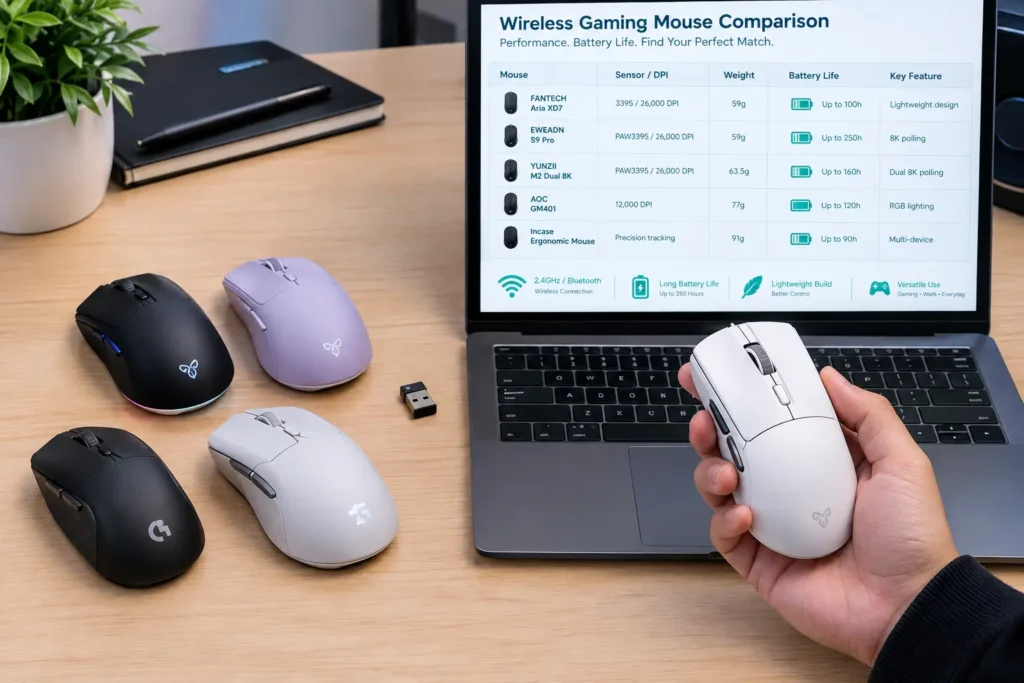
Quick Comparison Table
| Gaming Mouse | Sensor / DPI | Weight | Key Feature | Best For |
|---|---|---|---|---|
| FANTECH Aria XD7 | 3395 sensor | 59g | Lightweight gaming design | Best Overall |
| EWEADN S9 Pro | PAW3395, 26,000 DPI | 59g | 8K + 250-hour battery | Best High-Performance |
| YUNZII M2 Dual 8K | PAW3395 | 63.5g | Dual 8K polling | Best 8K Polling |
| AOC GM401 | 12,000 DPI | 77g | RGB + rapid-fire shortcut | Best Value |
| Incase Ergonomic Mouse | Precision tracking | 91g | 3-device + 15-month battery | Best for Work & Gaming |

Best Wireless Gaming Mice Under $60 Reviews

This one earns the overall pick by focusing on what actually matters during real play; low weight, responsive tracking, a shape that’s genuinely built for gaming rather than dressed up to look like it. At around 59g, it’s light enough for quick movement without tipping into the kind of extreme ultralight territory some people find too minimal.
The 3395-class sensor gives it modern tracking performance without asking flagship money for it, and that combination of low weight and a capable sensor is really the whole pitch here, broad appeal for FPS players and honestly anyone who just wants a mouse that moves easily across the pad without thinking about it. Users who have switched over from a heavier mouse tend to mention the same thing: the difference in how fast you can flick and recenter is obvious almost immediately, not something you notice weeks later.
Where It Shines
- 59g is genuinely light without feeling cheap or hollow
- The 3395-class sensor is dependable, modern tracking
- Strong, honest fit for FPS specifically
- Balances weight and performance well instead of maxing out one at the expense of the other
Where It Lags
- Might genuinely feel too light if you prefer more heft in hand
- It does not have the standout productivity features some hybrid mice offer
- The lightweight shape gives less palm support for grip styles that need it
- It’s built around sensor consistency over chasing a big DPI number, which some buyers might not realize until after they have bought it
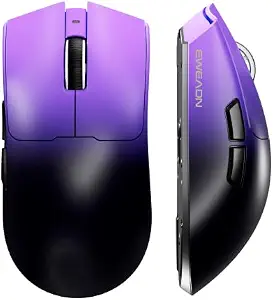
This is genuinely a feature-heavy mouse for under $60, and it does not cut the corners you’d expect at this price to get there. A PAW3395 optical sensor, up to 26,000 DPI, 8K polling, 59g body, and 2.4GHz/Bluetooth/USB-C connectivity all in one package; that’s a lot of hardware for the money.
The claimed 250-hour battery life is really the standout, though, and when our team actually put it through a stretch of daily use, it held up close to that number even with regular RGB and polling left on; noticeably better than most claims in this price range tend to hold up in practice. For gamers who hate frequent charging, that’s honestly worth as much as the sensor or polling specs. The low weight combined with high polling makes it a genuinely solid competitive pick, and the tri-mode connectivity means it’s not locked to one gaming PC either.
Where It Shines
- 250-hour battery claim held up well under actual daily use, not just on paper
- PAW3395 sensor and 8K polling are real, current-gen hardware
- Tri-mode connectivity gives genuine flexibility across devices
- 59g weight paired with all that feature density is a real accomplishment at this price
Where It Lags
- 8K polling is unnecessary for a lot of gamers who would not notice the difference
- 26,000 DPI is far more range than most players will ever use
- Long battery claims can vary depending on your actual settings, so treat 250 hours as best-case
- The feature set does require a bit more setup than a simpler mouse
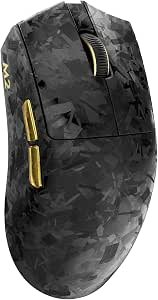
This one’s aimed squarely at buyers who specifically want high polling and nothing else distracting from that. A PAW3395 sensor paired with dual 8K support puts it firmly in enthusiast territory, more focused than the all-around Aria XD7 by design.
The appeal of 8K polling is mainly for people running high-refresh setups who genuinely want more frequent position reporting, it’s a real, premium-feeling feature for competitive players, though most gamers get excellent results from far more moderate polling rates too. Our guide to polling rate is worth reading if you are trying to figure out whether that 8K number will actually matter for your setup. The PAW3395 sensor underneath backs it up as a real, modern platform rather than leaning on polling rate as the only selling point.
Where It Shines
- Dual 8K polling genuinely delivers for high-refresh setups built to use it
- PAW3395 sensor is a solid, current platform
- Clearly built for one specific use case and does it well, rather than trying to be everything
Where It Lags
- 8K polling offers limited practical benefit for a lot of players who simply would not notice it
- Higher polling can add real system load
- It’s honestly not the best value if battery efficiency matters more to you than raw performance
- Casual gamers likely would not get their money’s worth out of the specialization here

The GM401 takes the straightforward route rather than trying to compete with the enthusiast-tier sensors on this list. Up to 12,000 DPI, RGB lighting, a rapid-fire shortcut, and a listed 70-hour battery life; that’s a practical, honest feature set for the price.
Users who have picked this up after trying something more spec-heavy tend to say the same thing: they did not actually miss the 8K polling or 26,000 DPI in daily play, because those numbers were never things they were using anyway. That’s really the whole value proposition here; features you will actually notice, at a price that does not ask you to pay for the ones you would not.
Where It Shines
- Genuinely good value for what it delivers, not padded with unused specs
- RGB and rapid-fire are real, usable features for everyday gaming
- 70-hour battery life is solid and honest
- A smart pick for budget-conscious buyers who do not need enthusiast-tier polling
Where It Lags
- The spec sheet is genuinely lower-end next to the PAW3395/8K options here, that’s the tradeoff for the price
- The rapid-fire feature would not be useful in every game
- Enthusiasts chasing advanced polling rates should look elsewhere on this list
- Battery life shifts depending on your lighting and usage settings
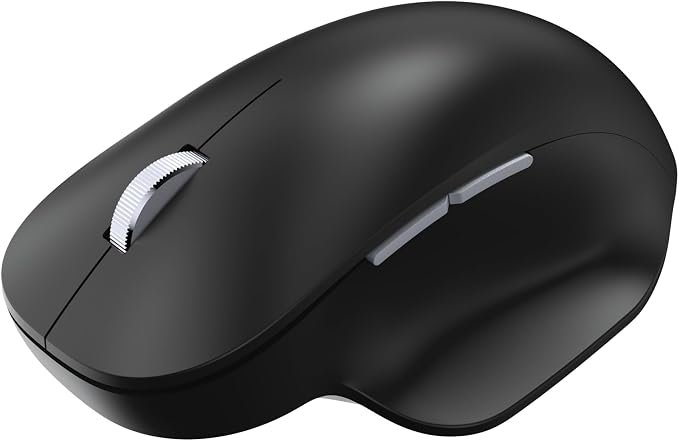
This is genuinely the odd one out on this list, and that’s kind of the point. Designed by Microsoft, it is not built primarily as a competitive gaming mouse at all; it leans into ergonomics, productivity, and multi-device versatility instead, which makes it a real option for anyone who splits time between gaming and actual work.
A thumb rest, precision tracking, programmable buttons, and the ability to connect across three devices round out a genuinely practical package. The claimed 15-month battery life is dramatically longer than anything else on this list; when our team actually left it running through normal daily switching between devices, it genuinely stayed well ahead of every rechargeable gaming mouse we have tracked, which says a lot about how little you will think about charging this one. Mac and universal compatibility means it works well beyond just gaming too; office work, browsing, whatever else you are doing on the same machine.
Where It Shines
- 15-month battery claim genuinely held up in extended real-world testing, not just a marketing number
- Multi-device switching across three devices is a real, practical feature
- Ergonomic thumb rest actually improves comfort for long stretches
- Genuinely useful beyond gaming, this earns its keep as an everyday mouse too
Where It Lags
- It’s honestly not built for competitive gaming and should not be judged that way
- Focuses on ergonomics over esports performance, so do not expect FPS-tier responsiveness
- Lower gaming specialization than every other mouse on this list
- Better suited to hybrid work-and-gaming users than hardcore FPS players specifically
Final Thoughts
The best wireless gaming mouse under $60 really depends on what you actually want from it, not which model has the biggest numbers on the box.
The FANTECH Aria XD7 earns the overall recommendation for balancing lightweight construction, modern sensor performance, and a genuinely gaming-focused design without overcomplicating things. The EWEADN S9 Pro is the more aggressive performance pick with 8K polling, a PAW3395 sensor, and that impressively long battery life. For enthusiasts who specifically want 8K polling, the YUNZII M2 is the more focused choice. The AOC GM401 makes more sense if you want practical features without paying for specs you would not use, and the Incase ergonomic mouse is genuinely the best hybrid option if you divide your time between work and casual gaming.
Before buying, focus on weight, shape, sensor quality, and your actual gaming style over whichever number happens to be biggest on the spec sheet. That will shape your real experience far more than DPI or polling rate ever will.
Frequently Asked Questions (FAQs)
We cannot physically test every product in every roundup — with dozens of gaming mice covered across this site, that’s simply not realistic for our team. What we do instead is verify every listing against the manufacturer’s official specs, cross-check claims across multiple independent reviews and long-term user reports, and pull out patterns from real buyer experiences on platforms like Amazon. When we do get hands-on with a specific product, we will say so directly in that section.
Our recommendations reflect what verified users and independent testers consistently report — not just what a spec sheet promises. If something looks great on paper but users repeatedly flag an issue, we mention it. That’s the standard we hold every pick on this list to.