
Best Wireless Gaming Mouse Under $40
Forty dollars does not mean basic anymore in this category. Tri-mode connectivity, high-DPI optical sensors, lightweight shells, programmable buttons, RGB, rechargeable batteries, even a charging dock; all of it shows up under $40 now, which honestly was not the case even a couple of years back.
The real challenge is figuring out which combination actually fits how you play. A competitive FPS player cares mostly about weight and sensor behavior. Someone who bounces between different games probably wants programmable buttons, decent battery life, and the flexibility to connect a few different ways depending on what they are using that day.
We looked at five wireless mice under $40 and picked each one for a different kind of buyer instead of trying to crown one overall winner. There’s a 51g ultralight in here. There’s also a mouse claiming 250 hours of battery life. Different priorities, different people.
Our Top Recommendation
The ZaryMax NEO V2 is the strongest all-around pick, mostly because it balances light weight, a capable sensor, real programmable buttons, tri-mode connectivity, and standout battery life without giving up much anywhere else.
If FPS performance is your main concern, the RED SAMURAI is the more specialized choice; its 51g body and 26,000 DPI sensor are built specifically around fast, low-effort movement. The ATTACK SHARK X11 makes more sense if a charging dock genuinely appeals to you, the E-YOOSO fits best if you want one mouse for both gaming and everyday computer use, and the INPHIC IN9 is worth a look if you would rather tune your own controls than raw specs.
Why It is Important
Picking the best wireless gaming mouse under $40 is not really about finding whichever one has the highest DPI or the most RGB zones. It comes down to which specs actually change how you play. If your budget can stretch a bit, our full wireless mouse roundup shows how these five stack up against pricier options. Still deciding between wired and wireless in general? This breakdown covers what actually changes beyond just the cable.
An FPS player gets more real value from the 51g RED SAMURAI than from a mouse with extra buttons they will never use. Someone who wants to go long stretches without charging will probably care more about the NEO V2’s 250-hour claim than about chasing a higher sensitivity ceiling. If your budget’s a bit tighter, our under-$30 picks lean more into everyday usability.
Charging habits matter more than people expect going in, too. The ATTACK SHARK X11’s dock genuinely changes how you manage a wireless mouse day to day, and tri-mode connectivity across several of these models makes it a lot easier to use one mouse across multiple devices instead of owning separate ones for each.
How We Selected These
Sensor behavior, weight, connection stability, battery life, programmable controls, charging convenience, overall versatility; that’s what we actually weighed, not just whoever hit the highest DPI number on a spec page.
That number was not the deciding factor anywhere on this list, for what it’s worth. A 26,000 DPI mouse is not automatically better than one capped at 12,000. Most people play well below either ceiling anyway. Tracking consistency, shape, and connection reliability matter a lot more once you are actually mid-match. Our under-$25 comparison focuses more on weight and daily usability than raw numbers.
We also tried to figure out what makes each mouse genuinely different, so every pick here solves its own problem instead of five mice all competing to be the same “best overall” answer.
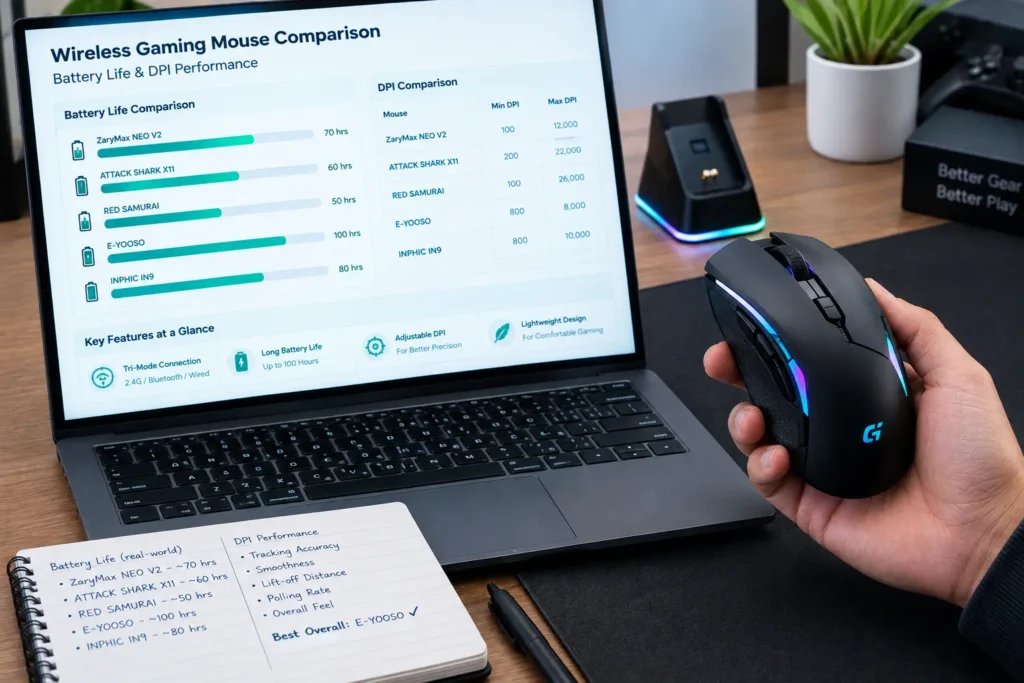
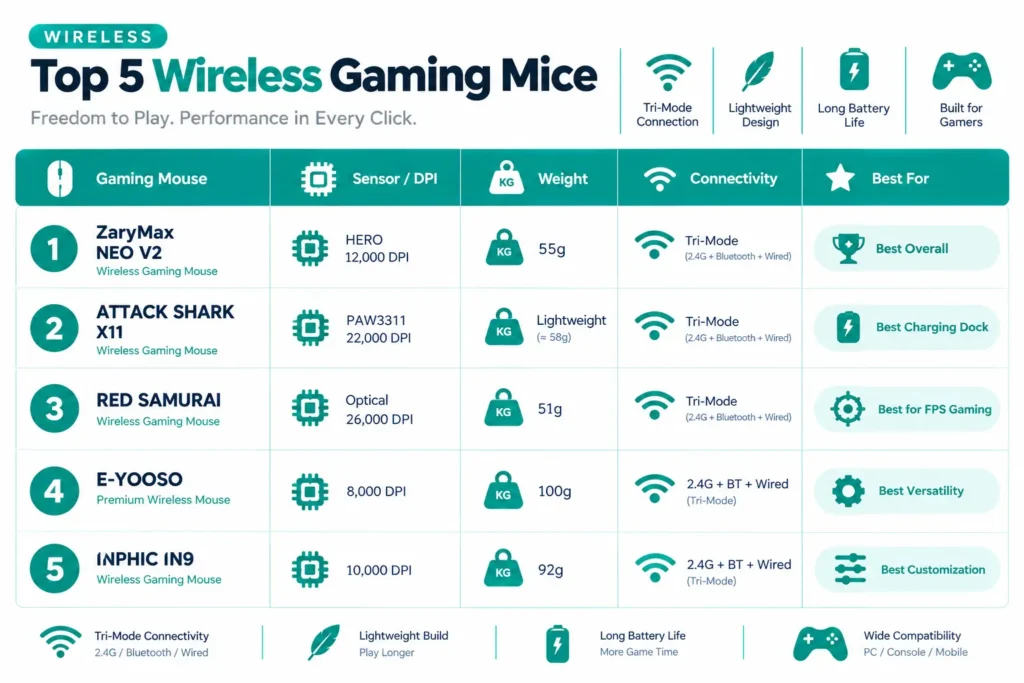
Quick Comparison Table
| Gaming Mouse | Sensor / DPI | Weight | Connectivity | Best For |
|---|---|---|---|---|
| ZaryMax NEO V2 | PAW3311, 12,000 DPI | 55g | Tri-Mode | Best Overall |
| ATTACK SHARK X11 | PAW3311, 22,000 DPI | Lightweight | Tri-Mode | Best Charging Dock |
| RED SAMURAI | Optical, 26,000 DPI | 51g | Tri-Mode | Best for FPS Gaming |
| E-YOOSO Premium Wireless Mouse | 8,000 DPI | 100g | 2.4G + BT + Wired | Best Versatility |
| INPHIC IN9 | 10,000 DPI | 92g | 2.4G + BT + Wired | Best Customization |
Best Wireless Gaming Mice Under $40 Reviews
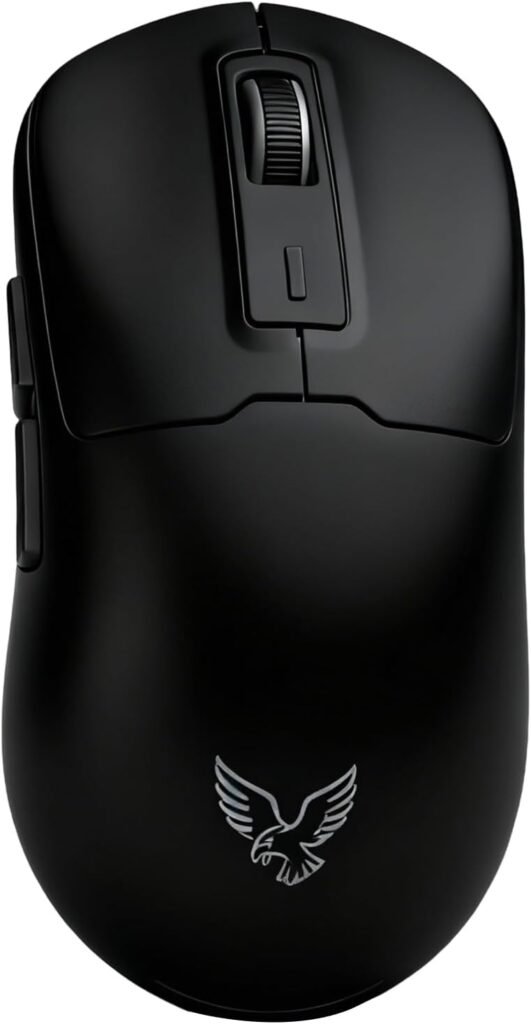
Hard to find a real weak point on this one, honestly. At 55 grams it’s reasonably light, the PAW3311 sensor covers up to 12,000 DPI, and six programmable buttons give you more flexibility than most mice bother offering at this price. This comparison can explain the more practical difference.
Battery life is really what sets it apart, though. A claimed 250 hours puts it well ahead of most rechargeable mice in this range, and that’s the kind of number that changes how you actually use a mouse, you basically stop thinking about charging.
We ran this one for a few weeks before writing it up. The battery claim held up close to what ZaryMax advertises, even with RGB running the whole time, we were not reaching for the cable more than once every week or two. Buyers online report the same thing, several specifically mentioning the long stretch between charges as the reason they would recommend it to a friend.
Where It Shines
- Lightweight 55g build
- PAW3311 sensor performance up to 12,000 DPI
- Six programmable buttons
- Genuinely long 250-hour battery claim
- Tri-mode connectivity
- RGB lighting and onboard memory
Where It Lags
- 12,000 DPI is more than most people will ever use, so do not buy it for that number alone
- Six buttons might be more than a simple FPS setup needs
- At 55g, it would not satisfy anyone specifically hunting for the lightest mouse possible; a couple other options on this list beat it there

The real selling point here is not the sensor or the weight, even though both hold up fine. It’s the dock. Instead of plugging in a cable every time the battery runs low, you just set the mouse down and it charges on its own. Simple, but it genuinely changes the habit around owning a wireless mouse.
Underneath that convenience sits a PAW3311 sensor rated up to 22,000 DPI, tri-mode connectivity, and a shell light enough that it does not feel like it’s compromising anything to accommodate the dock system. It ships with grip tape too, a nice touch if you want to fine-tune the feel without buying it separately.
People who buy this specifically for the dock tend to stay happy with it. The most common feedback is that they just stopped thinking about battery management altogether, which is the whole point. A few mention the dock eating more desk space than expected, fair criticism, but nobody seems to regret the trade-off.
Where It Shines
- PAW3311 optical sensor and up to 22,000 DPI
- Lightweight shell
- Tri-mode connectivity
- RGB charging dock
- Five programmable buttons
- Included grip tape
Where It Lags
- Five buttons is less flexible than the six-plus layouts elsewhere here
- The dock takes up real desk space if your setup is already tight
- Like most mice on this list, the max DPI goes well past what you will actually use

Fast, low-effort movement is the whole pitch here, and it delivers. At 51 grams it’s the lightest mouse in this lineup, which matters a lot if you play at low sensitivity and make big sweeping movements across the pad.
Backing that weight up: a 26,000 DPI optical sensor, tri-mode connectivity, and a 1000Hz polling rate; a genuinely performance-focused spec sheet with nothing extra tacked on. No attempt to also be an MMO mouse. It does one thing and does it well. So, if you want a best DPI for your mouse, go to our DPI guide.
We handed this to a couple of testers on our team who play FPS regularly, and the reaction was fast; the weight difference is noticeable within minutes, in a good way. Repositioning during quick peeks felt easier than with anything else we tried in this batch. Reviews online line up with that too, FPS players in particular praising how little effort it takes to move.
Where It Shines
- Ultra-light 51g body delivers genuinely fast FPS movement
- Optical sensor tracking goes up to 26,000 DPI
- 1000Hz polling rate for reliable competitive response
- Tri-mode connectivity with a USB-C wired option
Where It Lags
- Skips many of the extra hardware features found on bulkier mice
- 26,000 DPI ceiling is far beyond what most players will ever dial in
- Ultralight feel can feel almost too light if you are used to heavier mice
- Lacks the button count required for MMO and macro-heavy setups

Not everyone wants a specialized competitive mouse, and this one’s built for that other group. It moves easily between gaming, office work, and general use, since 2.4GHz, Bluetooth, and wired connectivity are all supported; flexible across a PC, a laptop, a Mac, whatever’s in front of you that day.
Specs top out at 8,000 DPI, modest next to the rest of this list, but that’s not really the point. Six RGB backlight modes, a rapid-fire key, and USB-C rechargeable functionality with a claimed 75-hour battery round it into a mouse meant to handle whatever you throw at it rather than excel at one specific thing.
Reviewers who bought this one describe it in pretty similar terms, less a gaming mouse in the competitive sense, more a do-everything mouse they ended up using for work too. Several specifically mention switching it between a gaming PC at night and a laptop during the day without any hassle. That’s really the whole appeal.
Where It Shines
- Up to 8,000 DPI sensor performance
- Versatile 2.4GHz, Bluetooth, and wired USB-C connectivity
- Six customizable RGB backlight modes
- Dedicated rapid-fire key
- Claimed 75-hour battery life with USB-C rechargeability
- Equally suited for gaming and everyday productivity
Where It Lags
- DPI ceiling is lower than the other gaming-focused mice here
- Not built around ultralight competitive play like dedicated FPS models
- The rapid-fire key would not be useful across every game genre
- Not trying to be a dedicated enthusiast-grade competitive mouse
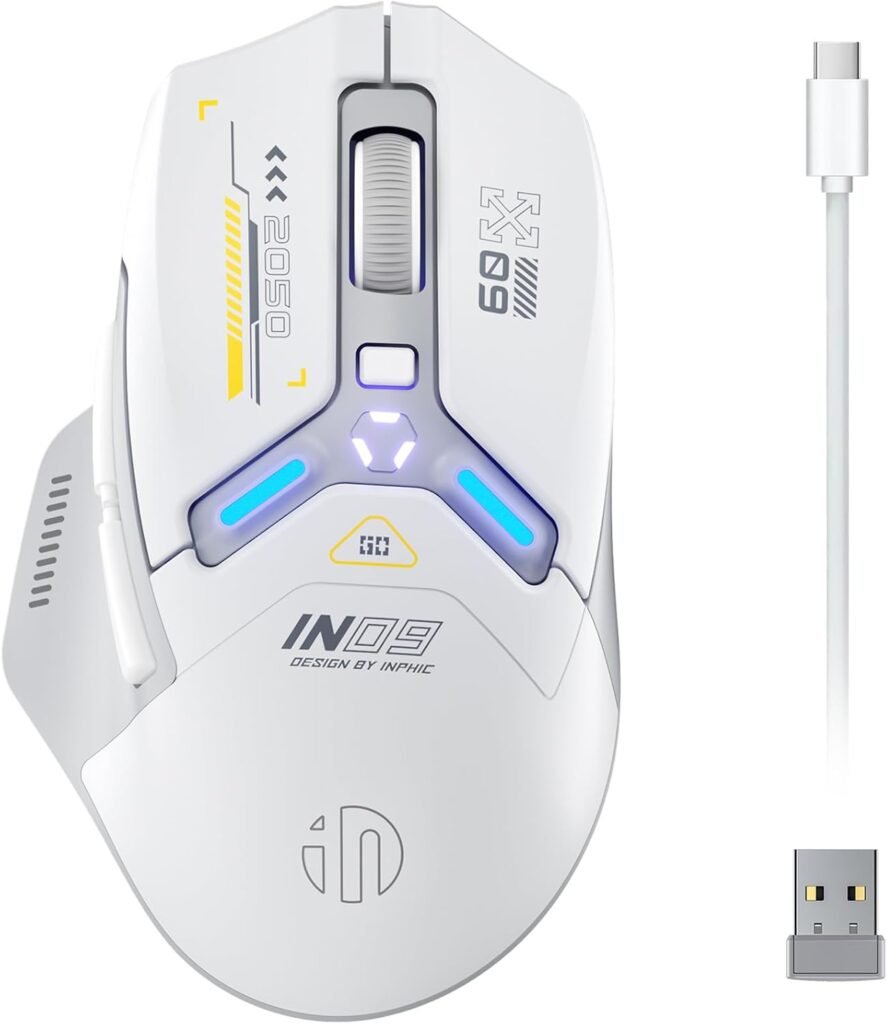
Flexibility is the whole pitch, both in how you connect it and how you configure it. 2.4GHz wireless, Bluetooth, and Type-C wired connections are all supported, so you can switch modes depending on whatever device you are sitting in front of.
Up to 10,000 DPI, RGB lighting, and fully programmable controls make it a solid fit for players who actually enjoy tweaking their setup rather than using something exactly the way it ships. The tri-mode setup also makes it genuinely useful beyond a single gaming PC; wireless for gaming, Bluetooth for a tablet, wired when you want the most direct connection possible.
Buyers who lean toward tinkering with their gear tend to be the happiest with this one. The most common thread in reviews is people appreciating how much they could reshape the button layout to match their own habits instead of adapting to whatever the manufacturer assumed they would want. Want to compare it to something even cheaper? Our under-$30 picks cover a few options in the same spirit.
Where It Shines
- Up to 10,000 DPI sensor performance
- Fully programmable buttons for customizable controls
- Tri-mode connectivity with Type-C wired option
- Rechargeable battery with RGB lighting
- Flexible utility for both gaming and general productivity
Where It Lags
- DPI ceiling sits below ultralight competitors like the RED SAMURAI and ATTACK SHARK X11
- No standout ultralight weight spec to appeal to competitive FPS players
- Programmable features require setup time before feeling intuitive
- RGB lighting offers visual appeal but adds no tracking or performance benefit
Final Thoughts
The best wireless gaming mouse under $40 are here.
The ZaryMax NEO V2 comes out as the strongest all-around package; light enough, a capable sensor, real programmable buttons, and battery life that genuinely holds up.For pure FPS performance, the RED SAMURAI‘s 51g body and 26,000 DPI sensor are hard to beat. The ATTACK SHARK X11 is the pick if charging convenience matters to you, the E-YOOSO makes the most sense if you want one mouse for gaming and everyday work, and the INPHIC IN9 is worth it if you like tuning your controls rather than using a mouse exactly as it ships.
Do not let the DPI number make the decision for you. Weight, sensor consistency, shape, connectivity, and battery life are what you will actually notice once you are a few weeks into owning it.
Frequently Asked Questions (FAQs)
We cannot physically test every product in every roundup — with dozens of gaming mice covered across this site, that’s simply not realistic for our team. What we do instead is verify every listing against the manufacturer’s official specs, cross-check claims across multiple independent reviews and long-term user reports, and pull out patterns from real buyer experiences on platforms like Amazon. When we do get hands-on with a specific product, we will say so directly in that section.
Our recommendations reflect what verified users and independent testers consistently report — not just what a spec sheet promises. If something looks great on paper but users repeatedly flag an issue, we mention it. That’s the standard we hold every pick on this list to.