
Best Wireless Gaming Mouse Under $25
A few years back, “wireless gaming mouse under $25” basically meant pick your poison: either a laggy connection or a battery that died on you halfway through a match. That’s not really true anymore. Mice in this range now show up with actual 2.4GHz and Bluetooth, rechargeable batteries, adjustable DPI, programmable buttons, even RGB. Same core ingredients you would find on a mouse twice the price. Just less polish around the edges.
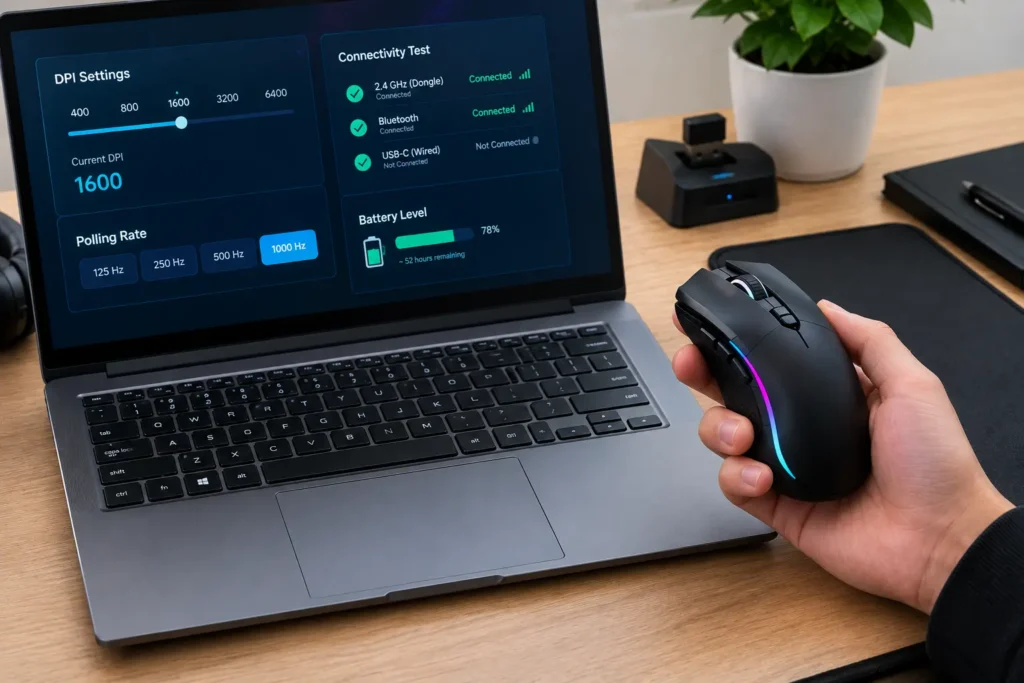
Going wireless only really pays off if a clean desk matters to you in the first place. No cable snagging your pad mid-flick, nothing tangled behind the monitor. Most budget models these days also let you hop between 2.4GHz, Bluetooth, and wired USB depending on what you are doing; more flexibility than you would expect for the money, honestly.
We landed on five mice for this list. None of them are trying to be the same thing. One’s built to be as light as physically possible, another’s all about connectivity, one’s for bigger hands, one’s for people who like fiddling with software, and one just tries to do a bit of everything reasonably well. Figure out which of those actually matters to you, and the rest sorts itself out.
Our Top Recommendation
Our overall pick is the Typehaven G57. Not the lightest mouse here. Not the highest DPI either. But between the 8,000 DPI sensor, programmable buttons, rechargeable battery, and three ways to connect, it does not really leave a gap anywhere. If you are not sure yet what you actually need, start here.
Weight your main concern? Go with the Redragon M725, 49 grams puts it in a different category entirely. Want flexibility above all else? The Uineer‘s got three connection modes and a 12,800 DPI ceiling. Bigger hands, tired of feeling cramped? That’s the Redragon Large. And if you are the type who likes opening up software and remapping every button just so, that’s the LTC GM025.
What Actually Changes the Experience
One thing worth knowing going in: the DPI number on the box almost never tells you what you actually want to know. Even at $25, small stuff: weight, shape, where the buttons sit, ends up mattering way more than a spec sheet suggests, once you are using the thing night after night instead of just reading about it.
Play style should be doing most of the deciding here. FPS players usually do better with something lighter, the M725 being the obvious example. Bigger hands? A fuller ergonomic shape beats a compact shell that starts cramping fingers after an hour, every time. And if you are bouncing between a laptop and a desktop regularly, tri-mode connectivity is going to matter to you way more than an extra 4,000 DPI you will never actually use.
Which is basically why there’s no single winner here, it depends on you. Matching the mouse to your hand, your games, how you connect, gets you further on a $25 budget than grabbing whatever has the longest spec list. Shopping even tighter? We have got picks for the best wireless gaming mouse under $15, or go lower still with the under $10 guide.
What Went Into These Picks
Connectivity, sensor specs, DPI range, button layout, weight, ergonomics, rechargeable design, customization; that’s what we weighed. Basically anything that shows up in real day-to-day use rather than just living on a spec sheet. Still fuzzy on what DPI actually does? Our explainer walks through it. Want to see how these hold up against pricier options? Our full wireless mouse roundup has more.
We did not just sort by sensor number and call it a day. A lighter mouse wins for fast FPS movement, full stop. A bigger ergonomic shape wins on comfort. Tri-mode connectivity can matter more than raw sensitivity if you are juggling a few devices. Tighter budget? Our under $20 picks are worth a look too.
Quick Comparison Table
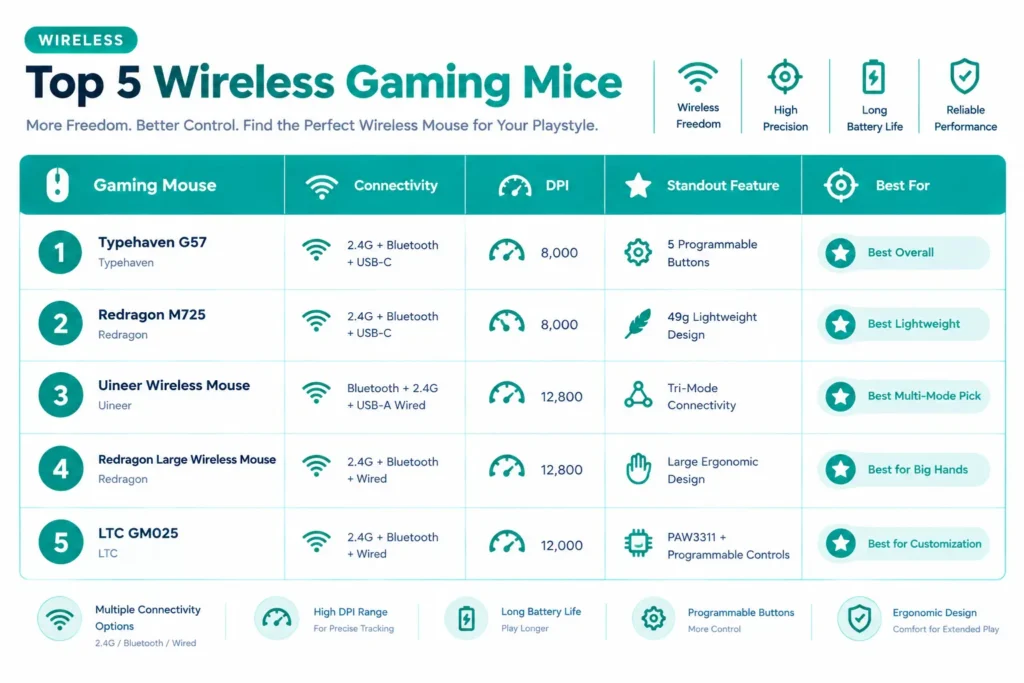
| Gaming Mouse | Connectivity | DPI | Standout Feature | Best For |
|---|---|---|---|---|
| Typehaven G57 | 2.4G + Bluetooth + USB-C | 8,000 | 5 Programmable Buttons | Best Overall |
| Redragon M725 | 2.4G + Bluetooth + USB-C | 8,000 | 49g Lightweight Design | Best Lightweight |
| Uineer Wireless Mouse | Bluetooth + 2.4G + USB-A Wired | 12,800 | Tri-Mode Connectivity | Best Multi-Mode Pick |
| Redragon Large Wireless Mouse | 2.4G + Bluetooth + Wired | 12,800 | Large Ergonomic Design | Best for Big Hands |
| LTC GM025 | 2.4G + Bluetooth + Wired | 12,000 | PAW3311 + Programmable Controls | Best for Customization |
Best Wireless Gaming Mice Under $25 Reviews

Nothing about the G57 tries too hard to get your attention. Honestly, that’s kind of the point. 8,000 DPI, around 80 grams, five programmable buttons, enough for both gaming and regular desk work, without tipping into a pricier bracket. Plain black shell, no flashy design swings, just a mouse that does what it says on the box.
Connectivity is really where it pulls ahead. 2.4GHz, Bluetooth, USB-C: use whichever fits your day instead of being locked to one. Rechargeable, so no cycling through AA batteries every couple weeks. Five buttons is enough room for macros or shortcuts without feeling like overkill either.
We kept this one in daily rotation for a full week: some gaming, some just browsing and work, mainly to see if the connection switching held up past a quick five-minute demo. It did. Reconnected almost instantly every time we swapped between 2.4GHz and Bluetooth, no dropped signal, no weird lag spikes. Matches what a lot of buyer reviews say too; people seem genuinely surprised a mouse this cheap holds a connection this well.
Where It Shines
- 8,000 DPI sensor delivers smooth, dependable tracking performance
- Versatile tri-mode connectivity featuring 2.4GHz wireless, Bluetooth, and USB-C
- Rechargeable battery for convenient wireless operation
- Five programmable buttons for customizable controls
- Balanced ~80g build well-suited for both gaming and everyday tasks
Where It Lags
- Noticeably heavier than modern ultralight competitive FPS options
- Five-button layout is restrictive for macro-heavy MMO or MOBA players
- Jack-of-all-trades profile lacks the focused edge of hyper-specialized mice

If low weight is the whole reason you are here, start with this one. At 49 grams, the M725 sits in a completely different league than most wireless mice at this price. You will notice it the moment you do anything involving big, fast sweeps across the pad.
8,000 DPI, three connection modes: Bluetooth 5.1, 2.4GHz, Type-C wired, so you are not trading away flexibility just to save weight. That honeycomb shell is what makes the low weight possible in the first place, paired with two side buttons and macro support for a bit of extra control.
Two of our testers, both mostly playing fast-paced shooters, ran a few sessions on this. Landed on roughly the same take: the shell feels odd on day one, almost too light, and then it just clicks. We have seen reviewers describe that exact same adjustment window elsewhere too; a few even said switching back to a heavier mouse afterward felt sluggish by comparison.
Where It Shines
- Extremely light 49g build delivers effortless glide and minimal hand fatigue
- 8,000 DPI sensor provides precise, dependable tracking performance
- Versatile tri-mode connectivity via Bluetooth 5.1, low-latency 2.4GHz, and Type-C wired
- Macro-programmable side buttons offer flexible custom control mapping
Where It Lags
- Perforated honeycomb aesthetic would not appeal to players preferring a solid shell
- Two-button layout is restrictive for macro-heavy genre requirements
- Featherweight feel can lack substance for users who prefer a heavier, grounded mouse

This one’s for people who care about connection flexibility above everything else, plain and simple. Bluetooth 5.0, 2.4GHz wireless, USB-A wired: three real options, and that matters a lot if you are bouncing between computers or just want wireless and wired both available without owning two mice.
Sensitivity tops out at 12,800 DPI, so there’s plenty of headroom regardless of what you are playing. 2.4GHz for regular wireless gaming, Bluetooth for compatible devices, or plug in USB-A when you want the most direct setup possible.
No single spec is really carrying this one; it’s the combination that works. Flexibility plus a wide sensitivity range makes it a genuinely practical pick if you move between devices a lot, more so than a mouse that’s just good at one thing and nothing else.
Where It Shines
- Up to 12,800 DPI sensor offers high sensitivity and smooth tracking
- True tri-mode flexibility with Bluetooth 5.0, 2.4GHz wireless, and USB-A wired connectivity
- Versatile multi-device compatibility suited for both gaming and general daily computing
Where It Lags
- Lacks the dedicated, hyper-focused engineering of pure competitive gaming mice
- USB-A wired connection is less convenient on modern USB-C-centric laptops
- 12,800 DPI ceiling is far higher than what most players will realistically utilize
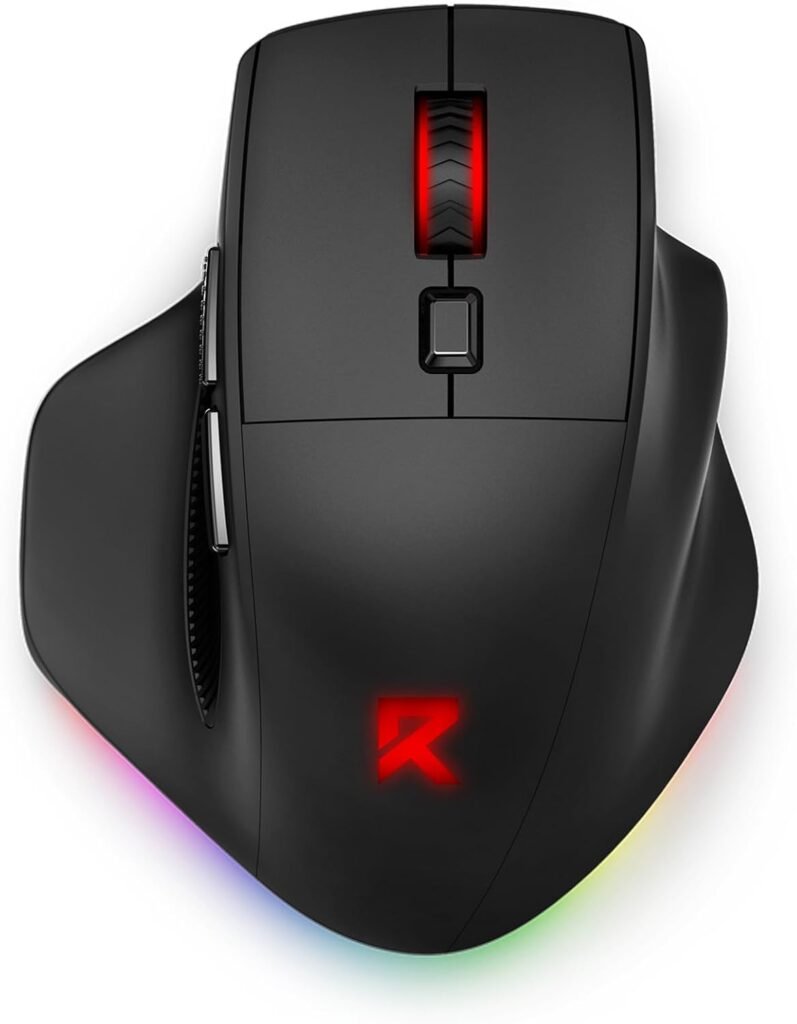
Built for anyone who’s ever found compact mice uncomfortable. The larger ergonomic shell gives your hand room to actually rest instead of curling around some tiny shape; an easy call if you have got bigger hands, or just prefer more mouse under your palm.
2.4GHz, Bluetooth, wired, rechargeable battery; the extra size does not cost you flexibility here. Two side buttons, macro programmability, six backlit lighting modes round things out, so there’s decent customization sitting on top of that comfort-first shape.
If hand cramping or fatigue on compact mice is a recurring problem for you, getting the size right is going to matter way more than any DPI number. This one’s built around exactly that, without giving up the wireless flexibility you would expect from a modern mouse.
Where It Shines
- Generous ergonomic shape specifically suited for larger hand sizes
- Versatile tri-mode connectivity for seamless switching between devices
- Rechargeable battery design eliminates the need for disposable batteries
- Six vibrant backlit lighting modes enhance desk setup aesthetics
- Programmable side buttons with macro support for gaming and everyday task shortcuts
Where It Lags
- Bulky frame is uncomfortable for smaller hands or compact grip preferences
- Noticeably heavier build compared to modern ultralight competitive alternatives

A strong pick if real customization matters to you and you do not want to pay premium prices for it. 12,000 DPI PAW3311 sensor, six programmable buttons, customizable RGB, and software that actually lets you adjust things instead of just picking from three preset colors.
Connectivity holds up its end too: 2.4GHz, Bluetooth, wired, all supported, so switching between setups stays simple. Between the sensor, the programmable buttons, and software that’s genuinely usable, the spec sheet punches a bit above its price. Worth remembering, though, a higher DPI ceiling does not automatically mean better performance. Our DPI explainer gets into why that number matters less than people think.
We spent time in the companion software specifically to see how deep the customization actually went. It held up better than expected for something this cheap. Remapping buttons, adjusting RGB zones; felt straightforward, not like an afterthought someone rushed out the door. Buyers who like tinkering with their gear tend to echo the same thing, often mentioning the software as more usable than they would assumed going in.
Where It Shines
- Reliable PAW3311 optical sensor delivers accurate 12,000 DPI tracking
- Versatile tri-mode connectivity across low-latency 2.4GHz, Bluetooth, and wired USB
- Six programmable buttons provide practical macro flexibility
- Customizable RGB lighting paired with dedicated software support for fine-tuning
Where It Lags
- Software customization features may feel overwhelming for plug-and-play casual users
- Six-button layout is still restrictive for macro-intensive MMO or MOBA gaming
- High 12,000 DPI ceiling goes well beyond what most players will practically use
Final Thoughts
The best wireless gaming mouse under $25 is not automatically whichever one has the highest DPI or the most RGB zones lit up. It comes down to how you play, how the mouse sits in your hand, and which features you will actually reach for.
The Typehaven G57 stays our top overall pick simply for how well it balances wireless connectivity, Bluetooth, USB-C, programmable buttons, and a rechargeable battery; no real weak spot anywhere. Chasing minimum weight instead? The Redragon M725 and its 49-gram build stand out on their own. Go Uineer if multi-mode connectivity is the priority, Redragon Large if you have got bigger hands, LTC GM025 if programmable controls and customization are what you are actually after.
Pick whatever you will genuinely use, not whatever spec looks most impressive on the box.
Frequently Asked Questions (FAQs)
We cannot physically test every product in every roundup — with dozens of gaming mice covered across this site, that’s simply not realistic for our team. What we do instead is verify every listing against the manufacturer’s official specs, cross-check claims across multiple independent reviews and long-term user reports, and pull out patterns from real buyer experiences on platforms like Amazon. When we do get hands-on with a specific product, we will say so directly in that section.
Our recommendations reflect what verified users and independent testers consistently report — not just what a spec sheet promises. If something looks great on paper but users repeatedly flag an issue, we mention it. That’s the standard we hold every pick on this list to.