
Best Wireless Gaming Mouse Under $50
Fifty bucks used to mean a compromise on a wireless mouse. You would lose the sensor, or the battery, or the comfort; pick one. That’s not really true anymore. Lightweight builds, sensors that actually track well, fast wireless, programmable buttons, batteries that outlast a weekend gaming binge; all of that shows up under $50 now if you know where to look.
Here’s the trap, though: bigger number does not mean better mouse. A 30,000 DPI mouse sounds like the obvious pick over an 8,000 DPI one. In practice, most of that difference is meaningless. What actually matters is shape, weight, and whether the sensor tracks consistently under your hand; none of which shows up as a headline figure.
We picked five wireless mice in this price range and, instead of ranking them against each other like they are all trying to be the same thing, matched each one to a type of player. Everyday comfort, ultralight FPS, enthusiast-grade sensor performance, ergonomic flexibility, or just something simple and lightweight; one of these five probably fits what you are after.
Our Top Recommendation
The Lenovo Legion M410 is our Best Overall pick, mostly because it does not overreach in any one direction. It’s comfortable, it does 16,000 DPI, six buttons, RGB, a battery that actually holds a charge, and NVIDIA Reflex support on top. Nothing flashy, just solid all around.
If you are an FPS player specifically, though, the Redragon M916 is the sharper tool with a weight of 49 grams, 4K polling rate, and you will feel both of those the moment you start flicking across the pad. Want the most sensor headroom you can get under $50? That’s the Typehaven G59. Care more about ergonomic comfort and switches that last than chasing extreme numbers? Go with the MSI Versa 300 W. And if you just want something lightweight that does not ask anything of you, the HyperX Pulsefire Haste 2 Core is exactly that.
Why It Matters
Picking the right wireless mouse under $50 really is about matching the hardware to how you play, not grabbing whatever has the biggest number attached to it. If your budget can stretch a bit, our full wireless mouse roundup shows how these five stack up against pricier options. Still deciding between wired and wireless in general? This breakdown covers what actually changes beyond just the cable.
A competitive FPS player is going to feel more benefit from the M916’s 49g frame than from a heavier mouse stacked with features they will never open the software for. Meanwhile, someone with a palm grip will probably find the Legion M410 more comfortable, even though it’s not the lightest mouse on this list. That’s really the whole idea; match the mouse to the player, not the spec sheet to some imaginary ideal user.
Numbers like 8,000Hz polling or 30,000 DPI look great in a bullet point. Realistically, almost nobody needs either. If you are trying to decide between 4K and 8K, this explainer on polling rate is worth five minutes before you assume it’s essential. Same story with DPI, here’s what those numbers actually mean, and why a higher ceiling is not automatically an upgrade.
How We Picked These
We looked at what genuinely changes day-to-day use: sensor quality, weight, connection stability, polling rate, battery life, ergonomics, and whether the programmable buttons actually feel useful once you have mapped them, not just how they read on a spec page. Sensor type matters here too; if you are torn between optical and laser, this guide covers the real difference.
Instead of sorting everything by max DPI, we thought about which style of player each mouse actually suits. Low-sensitivity FPS players tend to do better with something ultralight. Palm-grip users usually want more support under the hand. If your budget’s a bit tighter, our under-$30 picks lean more into everyday usability.
We also questioned whether “premium” features were actually useful or just impressive-sounding. High polling and extreme DPI appeal to enthusiasts, fair enough, but they are not a universal win for everyone. The real value comes from pairing the right features with the right shape for your hand. Going even lower on budget? Our under-$25 comparison focuses more on weight and daily usability than raw numbers.
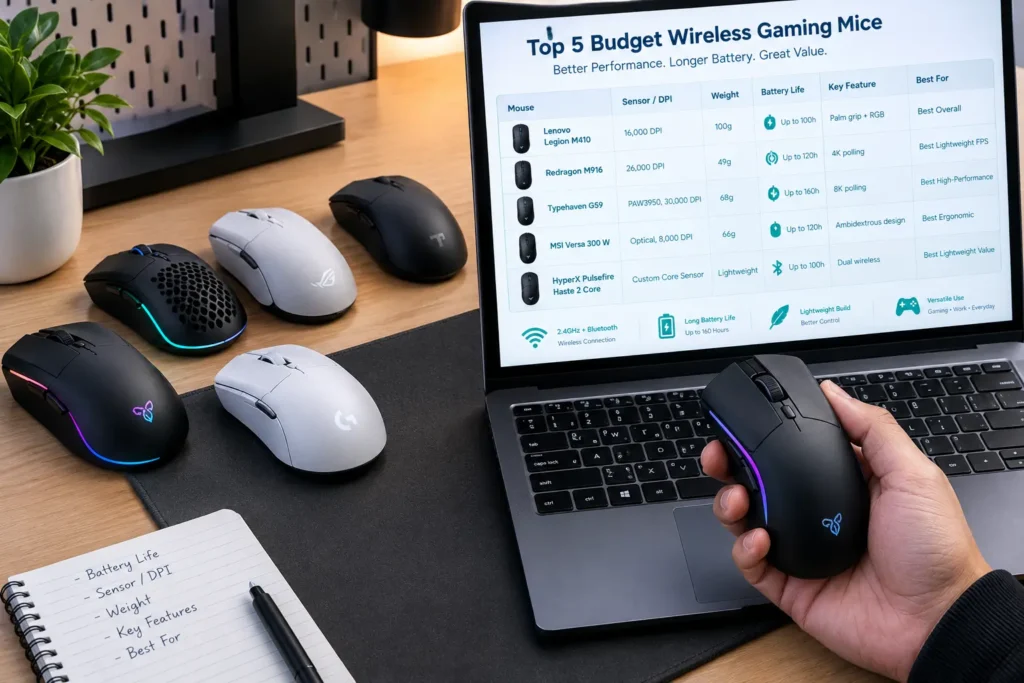
Quick Comparison Table
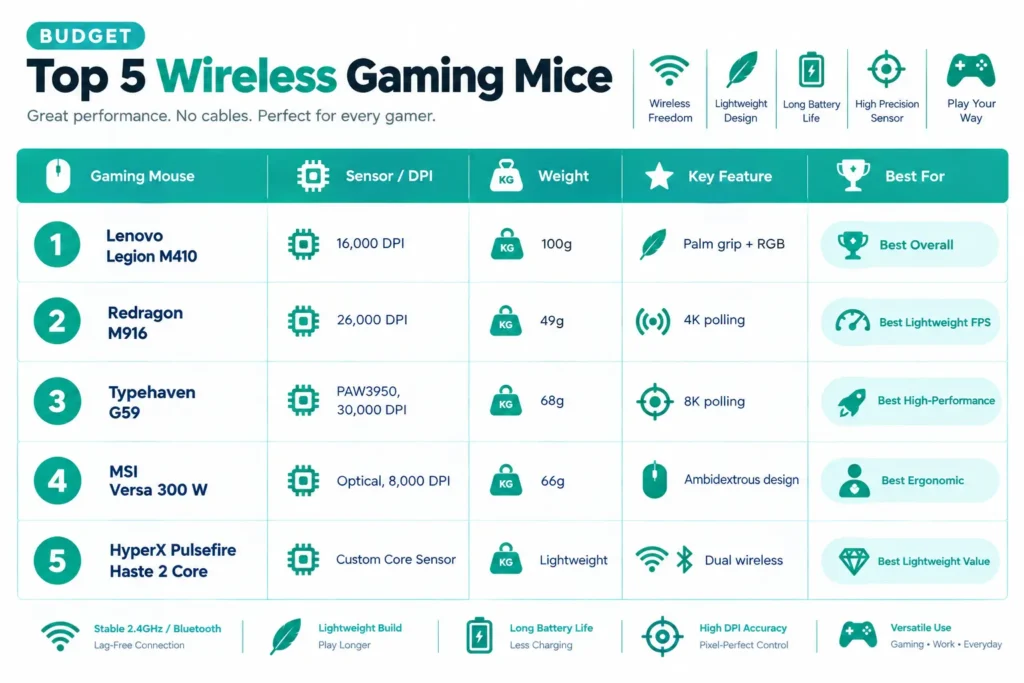
| Gaming Mouse | Sensor / DPI | Weight | Key Feature | Best For |
|---|---|---|---|---|
| Lenovo Legion M410 | 16,000 DPI | 100g | Palm grip + RGB | Best Overall |
| Redragon M916 | 26,000 DPI | 49g | 4K polling | Best Lightweight FPS |
| Typehaven G59 | PAW3950, 30,000 DPI | 68g | 8K polling | Best High-Performance |
| MSI Versa 300 W | Optical, 8,000 DPI | 66g | Ambidextrous design | Best Ergonomic |
| HyperX Pulsefire Haste 2 Core | Custom Core Sensor | Lightweight | Dual wireless | Best Lightweight Value |
Best Wireless Gaming Mice Under $50 Reviews
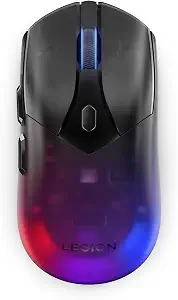
Ask what makes the M410 the top pick and honestly, it’s not any one feature; it’s that there’s just not much to complain about anywhere. 16,000 DPI, six buttons, a palm-friendly shape that most people get comfortable with pretty fast.
The 53-hour battery means you are not thinking about a charger every other night, and the two-zone RGB is there without trying too hard to be the main attraction. NVIDIA Reflex is a nice bonus if responsiveness in competitive games matters to you. Comparing it to something a step down in price? Our under-$40 picks are worth a glance too.
Our team spent a few weeks with this one, and what stuck out was not a spec; it was how it just kept being comfortable, session after session. It’s not the lightest mouse here, does not poll the fastest, but it never gave anyone a reason to put it down either. Amazon reviewers say close to the same thing, usually pointing at the battery and the palm fit as the reasons they stuck with it past the first week.
Good call if you want one mouse for everything; casual nights, longer sessions, regular desktop work. Less ideal if you are strictly a fingertip-grip player, since the shape leans palm-first, or if you are playing MMO and want more than six buttons. It will still work fine for those folks. It just was not designed with them specifically in mind.
Where It Shines
- Long 53-hour battery life
- Highly comfortable palm-friendly shape
- Solid 16,000 DPI for all-around use
- Includes NVIDIA Reflex for better responsiveness
Where It Lags
- On the heavier side
- Uncomfortable for pure fingertip-grip players
- Limited to 6 buttons (not ideal for MMOs)
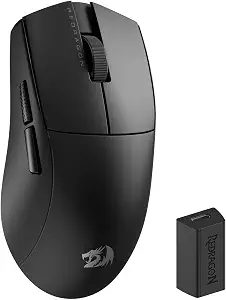
One job, and it does it well: fast, lightweight movement. At 49 grams, it’s the lightest thing on this list by a real margin, and that’s exactly why FPS players who sweep the mouse across big distances keep reaching for it.
It’s not light just to be light, either. Up to 26,000 DPI, 4K polling, programmable remapping, macro support; there’s real hardware backing the low weight. Less mass means less resistance when you flick, and that mix is what makes it genuinely solid for competitive play. Curious exactly how weight changes FPS performance? This guide gets into it.
What people say about it online lines up with what it’s built for. Reviewers mention how easily it repositions mid-fight, and a few admit the weight felt almost too light for the first session or two before it clicked. That adjustment period shows up more than any real complaint about the hardware itself.
Clear pick if you play at lower sensitivity and want to move fast without the mouse fighting your hand. Less natural if you are used to something heavier and more planted, or if you are playing MMO and want more buttons than a minimalist frame. It will still function fine for those cases, it’s just built around a different priority.
Where It Shines
- Ultra-lightweight at just 49 grams
- Impressive 26,000 DPI with 4K polling
- Perfect for fast FPS flicking
- Fully programmable
Where It Lags
- Extremely light feel requires a learning curve
- Minimalist frame offers very few hardware buttons
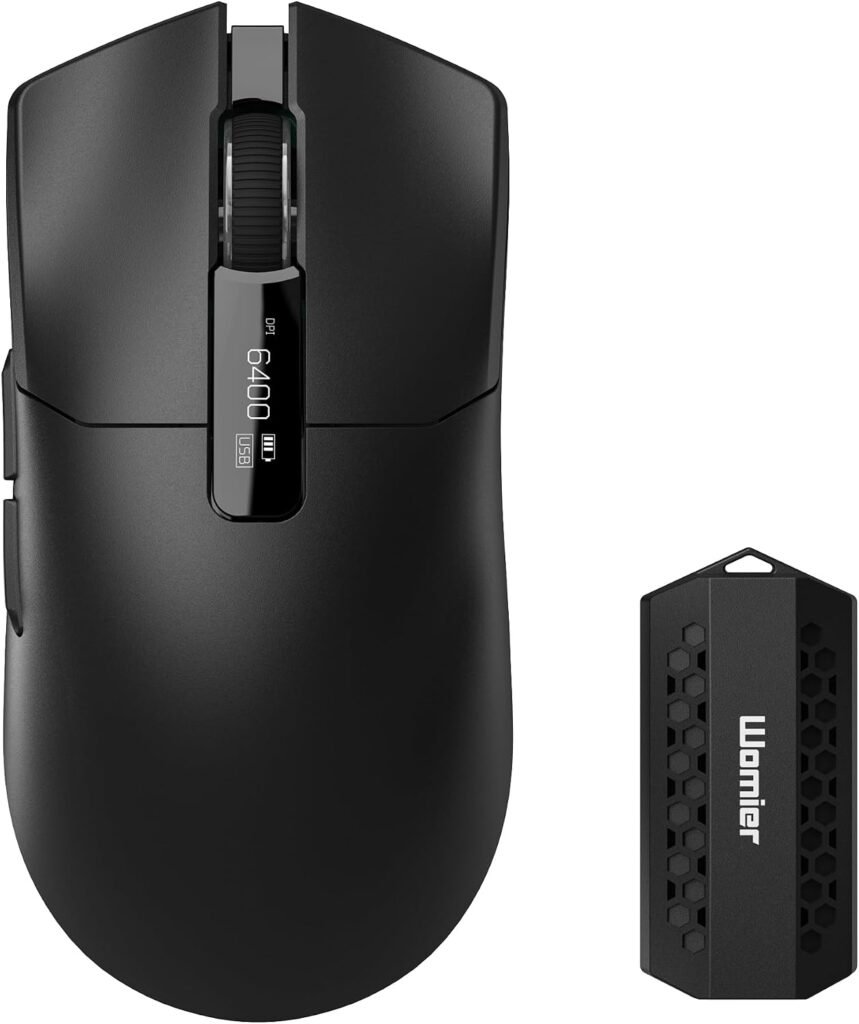
Nothing else on this list is as spec-heavy as the G59. PAW3950 sensor, 30,000 DPI, 8,000Hz polling; numbers well past what most people ever use, so it’s worth understanding what DPI actually means before that ceiling becomes the whole reason you buy it.
At around 68 grams, it sits between a traditional gaming mouse and an ultralight, so it feels a bit more substantial than the M916 without getting heavy. Connectivity is a genuine strength: 2.4GHz, Bluetooth, USB-C, all here, so it works across a gaming PC, a laptop, whatever you throw at it. Programmable buttons and RGB round it out for anyone who wants more control on top of the sensor.
We actually put the G59 through its paces specifically to check if 8K polling was doing anything real outside a benchmark. Honest answer, mostly only for players already dialed into that level of feel. Most of our testers could not tell 4K from 8K in regular play, though two of our more competitive testers noticed smoother tracking on fast flicks. Matches what buyers say too: people chasing enthusiast specs are happy, casual reviewers often admit they never bothered leaving the default polling rate.
Strongest choice if you are building a high-refresh setup and want genuine sensor headroom for under $50. It’s more mouse than a casual or budget player actually needs; for that crowd, something lighter or simpler on this list is probably the better fit.
Where It Shines
- Top-tier enthusiast specs (30,000 DPI and 8,000Hz polling)
- Versatile connectivity (2.4GHz, Bluetooth, USB-C)
- Balanced 68g weight
Where It Lags
- High 8K polling benefits only competitive pros
- Overkill and unnecessary for casual gamers
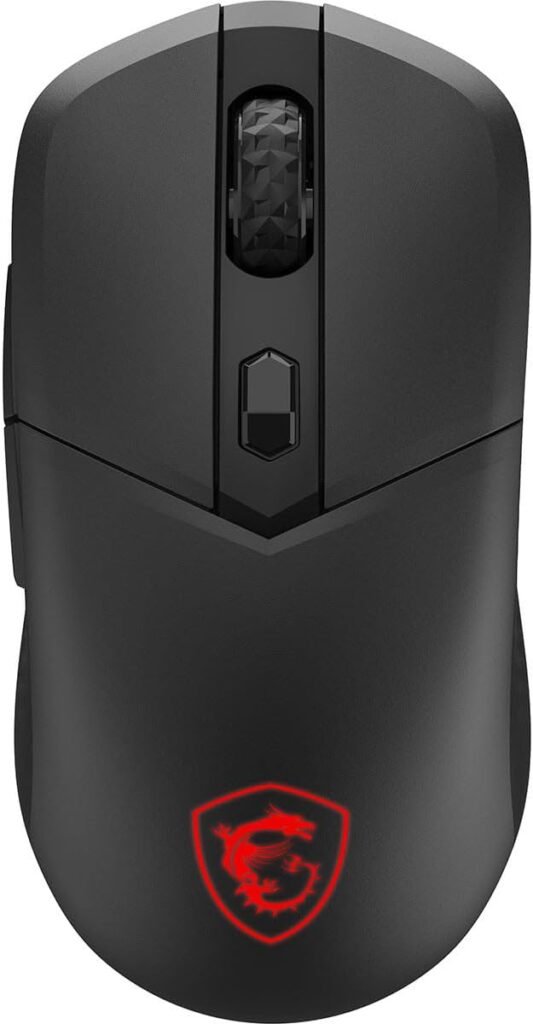
Different priority entirely here, comfort first. The ergonomic, ambidextrous shape makes it a flexible pick if you want something symmetrical that still holds up over a long session, rather than a shell sculpted for one hand only. Not sure optical’s the right sensor type for you? This comparison explains the practical difference.
Optical sensor up to 8,000 DPI, RGB lighting, Kailh switches rated past 30 million clicks; specs that make sense if you care more about long-term durability and daily comfort than chasing polling records.
Reviews on this one lean less toward raw performance and more toward how it holds up over months. A few buyers specifically bring up the switches still feeling solid well after purchase, which lines up with that 30-million-click number. Nobody’s buying this to brag about a spec sheet. They are buying it because it just keeps working.
Solid pick if comfort and reliability matter more to you than topping a chart, especially if you switch hands. Less of a fit if you are chasing the extreme sensor numbers of something like the G59; not because it struggles in casual play, but because raw sensor performance just is not the point here.
Where It Shines
- True symmetrical ambidextrous shape
- Durable Kailh switches rated for 30 million clicks
- Built for long-term comfort
Where It Lags
- Low sensor ceiling at only 8,000 DPI
- Missing the advanced specs needed for high-tier competitive gaming
This one’s for people who want a lightweight wireless mouse without paying extra for features they would not touch. Easy to move, dual wireless gives you flexibility across setups, and honestly, that’s most of the pitch.
That’s kind of the appeal, actually. It’s not trying to out-poll the G59 or out-weigh the M916. It’s just a dependable, lightweight mouse for everyday gaming. Want to compare it to something even cheaper? Our under-$30 picks cover a few options in the same spirit.
The HyperX name carries some weight too, for anyone who would rather stick with a brand they already know. Reviewers keep describing it the same way; the mouse they grab when they just want it to work, no setup, no fiddling.
Genuinely good fit if you do not need a dozen programmable buttons or top-tier sensor specs and just want something reliable. If you are after MMO-style button counts or the most advanced sensor here, you will find a better match elsewhere on this list; not because the Haste 2 Core comes up short, but because it was never trying to compete on that front.
Where It Shines
- Dependable lightweight design
- Dual wireless flexibility
- Straightforward plug-and-play experience from a trusted brand
Where It Lags
- Lacks advanced enthusiast features
- Basic button layout limits macro-heavy setups
Final Thoughts
Really comes down to priorities here, not whatever number happens to be biggest on the box.
The Lenovo Legion M410 takes Best Overall for how well it balances comfort, performance, battery, and useful features. FPS players get more out of the Redragon M916‘s 49g frame and 4K polling. The Typehaven G59 is the strongest enthusiast pick if you specifically want that PAW3950 sensor and 8K polling. The MSI Versa 300 W leans into ergonomic comfort and durability, and the HyperX Pulsefire Haste 2 Core is the simple, no-fuss option for anyone who just wants a lightweight mouse that works.
Before buying, weigh shape, weight, sensor consistency, and grip comfort more than whatever DPI number is printed on the box. Those are the things you will actually notice weeks in, long after the spec sheet stops mattering.
Frequently Asked Questions (FAQs)
We cannot physically test every product in every roundup — with dozens of gaming mice covered across this site, that’s simply not realistic for our team. What we do instead is verify every listing against the manufacturer’s official specs, cross-check claims across multiple independent reviews and long-term user reports, and pull out patterns from real buyer experiences on platforms like Amazon. When we do get hands-on with a specific product, we will say so directly in that section.
Our recommendations reflect what verified users and independent testers consistently report — not just what a spec sheet promises. If something looks great on paper but users repeatedly flag an issue, we mention it. That’s the standard we hold every pick on this list to.
One Response