
Ambidextrous or Ergonomic: Pick the Right Mouse Shape
Okay, so you bought a new mouse. Decent sensor, fair price, reviews looked fine. Then after a week your hand started acting up. Tight, a bit cramped, sore after a long night of ranked. Nothing’s broken. The shape just does not fit your hand.
So you go looking for another one and keep running into two words: ambidextrous and ergonomic. They sound like they are fighting each other. They are not.
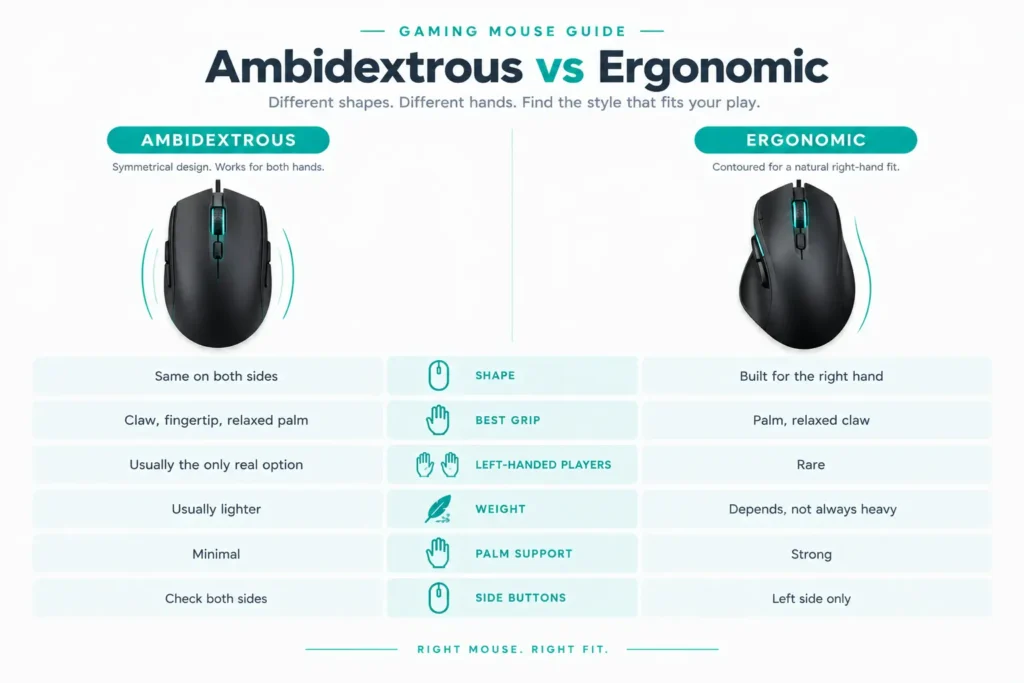
Ambidextrous just means the mouse is the same on both sides, so either hand can use it. Ergonomic means the body is shaped to sit under your hand. One is about which hand you use. The other is about how it feels to hold. Mix them up and you will end up comparing stuff that does not really matter against each other.
Let’s break it down.
The Short Answer
- Left-handed, or you claw/fingertip grip? Go ambidextrous.
- Right-handed, palm flat on the mouse, and your hand gets tired after a few hours? Go ergonomic.
If that’s you, you can stop reading. But the exceptions are worth a minute.
Quick Comparison Table
| Design Factors | Ambidextrous | Ergonomic |
|---|---|---|
| Shape | Same on both sides | Built for the right hand |
| Best grip | Claw, fingertip, relaxed palm | Palm, relaxed claw |
| Left-handed players | Usually the only real option | Rare |
| Weight | Usually lighter | Depends, not always heavy |
| Palm support | Minimal | Strong |
| Side buttons | Check both sides | Left side only |
What Ambidextrous Actually Means
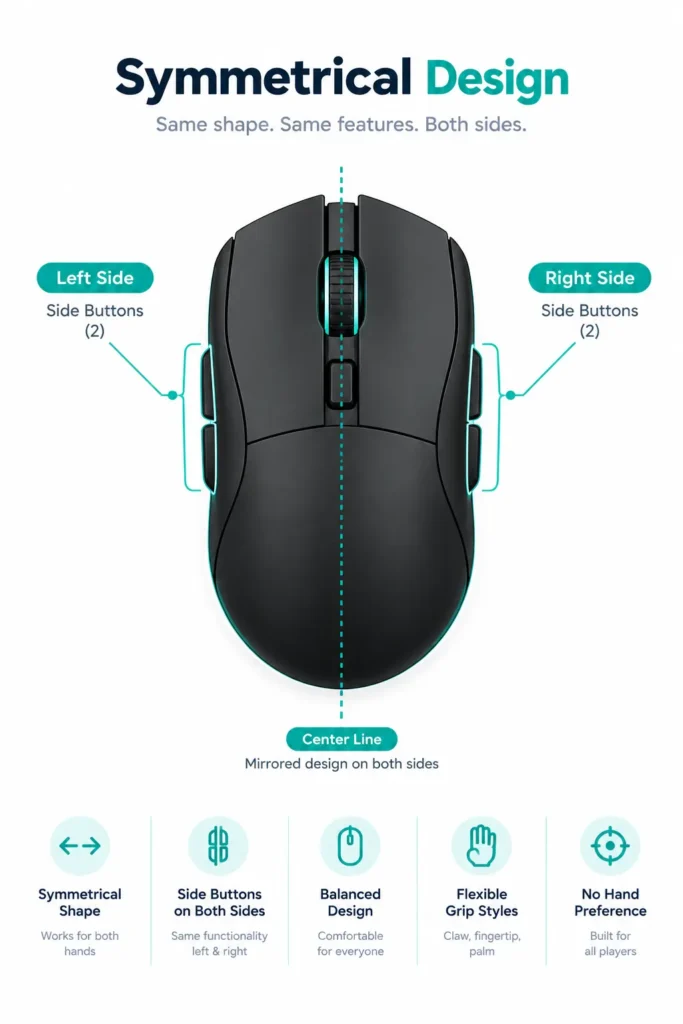
The shell is the same on both sides, so it does not care which hand grabs it. That’s the whole deal. It tells you nothing about the buttons, and that’s where people get burned.
Most symmetrical mice still stick the side buttons on the left, since that’s where a right-handed thumb sits. If you are a lefty, you plug it in, reach for your thumb button, and there’s nothing there. Super annoying in the middle of a match.
A few mice actually get this right. The Logitech G PRO 2 has magnetic side buttons you can move around. The Corsair M75 Wireless has buttons on both sides, and you pick which side gets the raised caps. Both show up in our ambidextrous gaming mouse roundup, if you want to compare them. If you are left-handed, check this first. Sensor and weight can wait.
Where it shines
- Works for left and right hands
- Usually lighter
- Good for claw and fingertip grips
- Easy to switch hands or setups
Where it lags
- Little or no palm support
- Side buttons might only be on one side
- Can feel flat over long sessions if you like resting your hand on something
What Ergonomic Actually Means

Ergonomic mice have an actual shape. There’s a hump for your palm, a slope toward your thumb, and sometimes a little shelf for the thumb to rest on. Almost all of them are made for right hands. Left-handed ones are hard to find, which is honestly the biggest reason people end up with the wrong mouse. We cover the best of the bunch in our ergonomic gaming mouse roundup.
People used to say these were heavy, and a few years ago that was fair. Not so much now. The Razer DeathAdder V3 Pro is 63 grams, the DeathAdder V4 Pro is 56, and both keep the full ergonomic shape. The wired Razer Basilisk V3 is heavier at around 101 grams, but you get a bigger grip and 11 buttons for it.
Where it shines
- Strong palm and thumb support
- Comfy in long sessions
- Side buttons are easy to reach if you are right-handed
Where it lags
- Mostly right-handed only
- Can feel bulky in small hands
- That contour can get in the way of a claw or fingertip grip
Quick reality check:
No mouse fixes a sore wrist. A good shape helps. But if your hand hurts all the time, go see someone who knows what they are doing.
How They Feel During Actual Gaming
What We Saw, and What Buyers Say
Specs only tell you so much. So here’s what our team noticed while playing with these mice, and what buyers keep saying.
Here, these reviews are given.
Our team on the ambidextrous side saw:
- Logitech G PRO 2: We spent a few sessions swapping the magnetic side buttons back and forth, mostly wondering if they would loosen over time. They did not. Every button stayed locked in, even through fast, repeated clicking.
- Glorious Model O 2 Wireless: We ran it for a week of mixed use and kept switching between its two connection modes. Each switch took a couple seconds, and we never had to re-pair it. If you are weighing a cable against no cable, our wired vs. wireless breakdown covers the trade-offs, and our wireless mouse roundup lists more options.
Our team on the ergonomic side saw:
- Razer DeathAdder V3 Pro: We gave this one a week of evenings, a few hours of mixed FPS and MOBA every night. The palm stayed supported the whole time. Nothing cramped up, even in the long sessions. Our hands never complained, and that was the whole point of the test.
What buyers say:
- Logitech G PRO 2: Most people who write about it talk about the shape and how light it feels. The magnetic side buttons come up a lot too, usually as a nice touch. A few say the symmetrical feel takes a bit to get used to. Some had trouble getting a higher polling rate to work, which is worth understanding before you buy. Our polling rate explainer breaks it down. Also, most of the buyers who wrote in did not say they were left-handed, so how those side buttons work for lefties is still kind of an open question.
- Razer DeathAdder V3 Pro: Light weight is the first thing people bring up, then battery and how it feels in the hand. Lots of buyers call it comfy and say the grip is solid. Some think the shape is different from older DeathAdders, and a few would rather have a rival’s shape. The usual complaints are price and wanting better software.
- Razer Basilisk V3: Comfort and grip keep coming up. Several buyers say their hand does not get tired after hours of play. The biggest complaint has nothing to do with shape. It’s Razer’s Synapse software, and people are not shy about saying so. If you are shopping on a budget, our budget mouse picks might be a better fit.
Where our team and buyers agree
- Comfort holds up: Our palm stayed supported all week, and buyers keep bringing up comfort and grip.
- The G PRO 2’s buttons earn their rep: Ours stayed put, and buyers like them too.
- Symmetrical shapes take a little getting used to: At least one G PRO 2 buyer says so, and yeah, it’s not instant.
Deciding in a Couple of Minutes
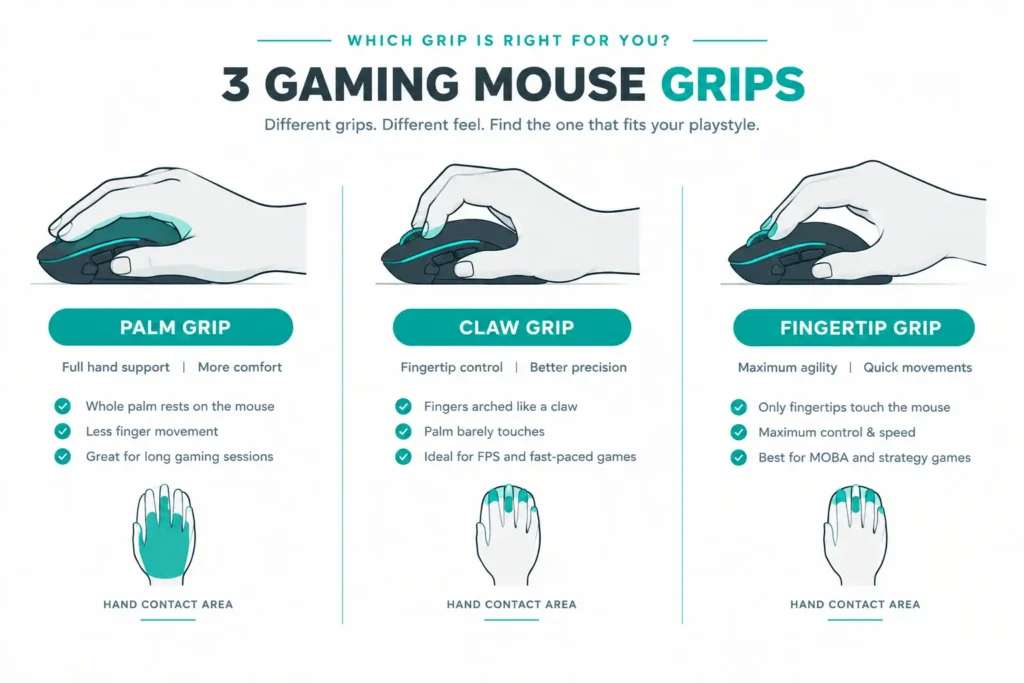
Still stuck? Let your grip settle it.

Final Verdict
Neither one is better. They are built for different hands.
Lefty, claw or fingertip grip, or you just want something light? Ambidextrous. Right-handed palm grip and long sessions? Ergonomic. Still cannot decide? Go by how you actually hold the mouse, not by the label on the box.
Frequently Asked Questions (FAQs)
Everything on this page comes from our team’s own experience, along with feedback from Amazon buyers and other verified users. We try to be straight about what we have seen, but experiences differ, and something that felt great to us would not necessarily feel the same to you. Fit, feel and habits are personal, so treat our advice as a starting point, not a promise.
We also pay attention to what real owners keep saying, not just what a spec sheet promises. If something looks great on paper but users keep flagging the same issue, we will mention it.