
Best Ergonomic Gaming Mouse: 5 Picks Your Hand Will Thank You For
Around the two-hour mark, your hand starts complaining. A thumb that’s cramping, a palm with nowhere to rest, fingers curled around a shell that was never shaped for them. It looked fine enough in the product photos. By the third match it’s genuinely uncomfortable.
That discomfort is exactly what an ergonomic mouse is supposed to fix. Give your hand somewhere real to settle, put the buttons where your fingers already fall, and do not make you carry extra weight just to get there. We picked five for this list: a wireless flagship, a wired classic, a mouse loaded with buttons, one that charges itself on a pad, and one that honestly is not even a gaming mouse. We shall explain that last one when we get to it.
Every spec here comes from the product listings themselves. When a listing left something out, we are saying so rather than guessing at it.
Our Top Recommendation
For most people without a strong preference already, the Razer DeathAdder V3 Pro is where we would point them first. It’s 63 grams despite the full ergonomic shell, runs 90 hours on a single charge, and carries a Focus Pro 30K sensor that tracks as well as anything else on this list. It’s the one we would hand over without hesitating.
From there, it comes down to what you actually need. Hate the idea of charging anything? Go wired with the Razer Basilisk V3. Want every single button mapped to something useful? The Logitech G502 X Lightspeed gives you room for that. Tired of plugging in a cable every night? The Corsair Dark CORE RGB PRO SE and its charging pad solve that. And if your mouse spends more hours in spreadsheets than in games, the Logitech MX Master 4 is the odd one out that genuinely makes sense here.
No Single Shape Works for Every Hand
Worth a quick warning before you spend any money. Ergonomic does not mean the same shape works for everyone. What fits one hand perfectly can feel completely off in someone else’s, and nearly every mouse on this list is built assuming you are right-handed. Hand size and grip style are not minor details here, they are the whole decision. Not totally sure how you actually hold a mouse? Our palm vs. claw vs. fingertip guide sorts that out in a few minutes.
Bigger hands specifically? Our large hands roundup is a better starting point. And if you are curious what actually separates a genuinely comfortable mouse from one that’s just expensive, this guide explains it in more depth.
What We Actually Weighed
Comfort during a long session came first, ahead of everything else on this list. After that: connectivity, battery life, sensor accuracy, and whether the extra buttons actually earned their spot or were just there to pad a spec sheet. Most of these run wireless, so a stable connection mattered a lot too. Still deciding between a cable and no cable at all? This wired vs. wireless breakdown lays out the real trade-offs.
We also wanted genuine spread across the five picks. One wireless flagship, one wired, one button-heavy, one that drops onto a charging pad, and one built for work that happens to double as a gaming mouse. Five picks, five different jobs, not five versions of the same thing.

Quick Comparison Table
| Gaming Mouse | Connectivity | Key Spec | Standout Feature | Best For |
|---|---|---|---|---|
| Razer DeathAdder V3 Pro | Wireless (HyperSpeed) | Focus Pro 30K, 63g | 90-hour battery | Best Ergonomic Wireless Gaming Mouse |
| Razer Basilisk V3 | Wired | Focus+ 26K, 11 buttons | Smart-Reel scroll wheel + RGB | Best Ergonomic Wired Gaming Mouse |
| Logitech G502 X Lightspeed | Wireless, USB-C | 13 buttons | Under 140-hour battery, wireless charging capable | Best Feature-Rich Ergonomic Gaming Mouse |
| Corsair Dark CORE RGB PRO SE | Wireless | 18,000 DPI, 8 buttons | Qi charging, sub-1ms wireless | Best Ergonomic Gaming Mouse with Qi Charging |
| Logitech MX Master 4 | Wireless, USB-C | 8K DPI any-surface | Haptic feedback, quiet clicks | Best Ergonomic Mouse for Work and Casual Gaming |

Best Ergonomic Gaming Mice, Reviewed

Start with the number that matters most: 63 grams. Ergonomic mice usually pay for their shape in extra weight, and this one mostly skips that trade entirely. Inside the shell you get a Focus Pro 30K optical sensor, Gen-3 optical switches, HyperSpeed Wireless, five programmable buttons, and a 90-hour battery. Curious how optical switches actually differ from mechanical ones? This explains it.
We spent a week of evenings on this one, a few hours of mixed FPS and MOBA each night, mostly to see whether our hands would start complaining the way they usually do. They did not. The palm stayed supported the whole way through, and nothing cramped even late into longer sessions. People who stepped up from a smaller mouse keep saying it looks bigger in photos than it actually feels once it’s in hand, and that matched what we noticed too.
Wondering why light and ergonomic so rarely show up together in the same mouse? Our weight guide has the longer explanation.
Pros
- 63g body
- Focus Pro 30K optical sensor
- Gen-3 optical switches
- HyperSpeed Wireless
- 90-hour battery
- Comfortable right-handed shape
Cons
- It is not cheap
- Five programmable buttons is on the lower side
- The right-handed shape leaves lefties without an option
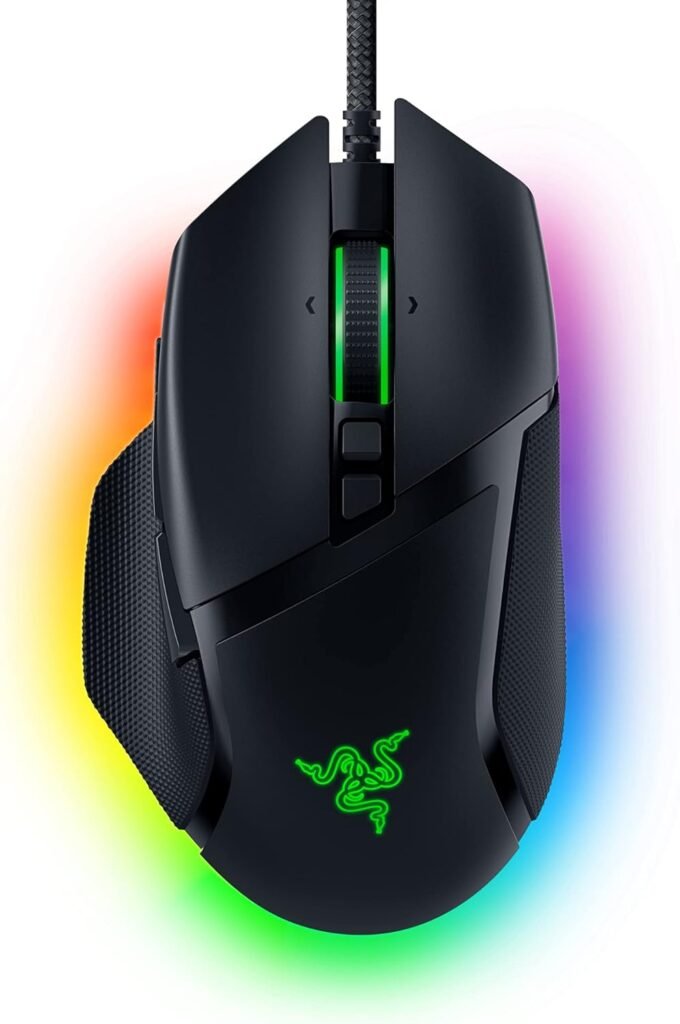
The wired option on this list. A Focus+ 26K optical sensor, 11 programmable buttons, a Smart-Reel scroll wheel, Chroma RGB, and a weight around 101 grams. The body runs fuller than most of the others here, with a secure grip and every button genuinely within reach instead of requiring a stretch.
Staying wired means there’s no battery to think about at all, which is honestly half the appeal for a lot of buyers. People who game for hours at a stretch say the grip feels planted and the buttons land right where their fingers already sit, so the hand ends up doing less work overall by the end of a session.
Pros
- A shape that keeps buttons in easy reach
- 11 programmable buttons
- Focus+ 26K sensor
- Smart-Reel scroll wheel
- Chroma RGB
Cons
- Heavier than the wireless picks here
- Razer Synapse is needed for full customization
- It’s wired only

Thirteen buttons, optical switches, an Infinite Scroll toggle, USB-C, wireless charging capability, and a battery listed at under 140 hours, all in a mouse that works with both PC and Mac. The G502 shape has a genuinely loyal crowd behind it, mostly because your thumb and palm actually get something solid to rest on rather than just a smooth curve.
About that battery figure: treat “under 140 hours” as the ceiling, not a guarantee, and expect somewhat less in real daily use. People coming over from older G502 models say the shape feels familiar within minutes of picking it up, and that cutting the cable is the single upgrade they notice the most.
Pros
- 13 buttons
- Optical switches
- Infinite Scroll toggle
- USB-C
- Wireless charging capable
- Genuinely supportive shape
Cons
- It’s big and a bit busy
- Wireless charging needs a compatible charger to actually work
- Thirteen buttons take real time to learn

The hook here is Qi charging. Set the mouse down on a compatible pad and it tops itself up on its own, no cable needed at all. On top of that you get 18,000 DPI, eight programmable buttons, sub-1ms wireless, iCUE software support, and compatibility across PC, Mac, PS5, PS4, and Xbox. The listing does not spell out exact shape measurements, but this belongs to Corsair’s Dark CORE family, which has a solid reputation for a fuller, palm-friendly body.
We left it sitting on a Qi pad overnight for several nights running, mainly to see if it would ever fail to pick up a charge. It never did, not once, and exact placement on the pad never seemed to matter much. For players who split time between a PC and a console, having one mouse that works comfortably on both turned out to matter more than we expected going in.
Pros
- Qi wireless charging
- 18,000 DPI
- Eight programmable buttons
- Sub-1ms wireless
- iCUE support
- Compatibility across PC, Mac, PS5, PS4, and Xbox
Cons
- Not an ultralight mouse
- Eight buttons will feel limiting to dedicated MMO players
- The Qi pad itself is a separate purchase

Honesty check first: this is not actually a gaming mouse. It’s a productivity mouse with a genuinely ergonomic shape, and we included it because plenty of people split their day between work and games on the exact same machine. Haptic feedback, ultra-fast scrolling, 8K DPI any-surface tracking, quiet clicks, USB-C, and support for both Windows and Mac make up the core of what it offers.
We used it across a full workday of documents and browser tabs, then switched straight into casual games in the evening to see how well it actually straddled both. We expected the haptics to feel gimmicky going in. They did not. They genuinely helped during menu navigation and scrolling, and the quiet clicks meant a late-night session never carried through to anyone else in the house.
The sculpted body is really what people end up buying this one for. People who sit at a desk all day keep saying it’s the first mouse that actually stopped their wrist from aching by the end of the workday.
It would not keep pace with a real gaming mouse in anything competitive, and it is not trying to. For a mixed day of work and relaxed evening gaming, though, it genuinely earns its spot here.
Pros
- Haptic feedback
- Ultra-fast scrolling
- Quiet clicks
- An 8K DPI any-surface sensor
- A genuinely ergonomic shape
- USB-C connectivity
Cons
- Not built for competitive gaming
- The haptics and scroll tricks matter a lot more at a desk than they ever would mid-match
Final Thoughts
Comfort is what actually wins long sessions, so pick the shape first and worry about the spec sheet second. The Razer DeathAdder V3 Pro remains the best all-round ergonomic pick here, light and genuinely wireless. The Razer Basilisk V3 suits anyone who wants wired with plenty of buttons to work with. The Logitech G502 X Lightspeed brings thirteen buttons without giving up a supportive shape underneath them. The Corsair Dark CORE RGB PRO SE is the one worth it for Qi charging and console play specifically. The Logitech MX Master 4 makes sense only if your mouse mostly lives at a desk doing work, but for that exact situation, it’s genuinely the right call.
Check your hand size and grip honestly before buying any of these. The best ergonomic mouse really is whichever one actually fits the hand holding it, not whichever has the longest spec sheet.
Frequently Asked Questions (FAQs)
We cannot physically test every product in every roundup — with dozens of gaming mice covered across this site, that’s simply not realistic for our team. What we do instead is verify every listing against the manufacturer’s official specs, cross-check claims across multiple independent reviews and long-term user reports, and pull out patterns from real buyer experiences on platforms like Amazon. When we do get hands-on with a specific product, we will say so directly in that section.
Our recommendations reflect what verified users and independent testers consistently report — not just what a spec sheet promises. If something looks great on paper but users repeatedly flag an issue, we mention it. That’s the standard we hold every pick on this list to.
One Response