
Optical or Mechanical Mice Switches? What You Actually Get With Each
Spend five minutes on a gaming mouse listing and you will trip over a pile of jargon. Optical this, mechanical that, a hybrid thrown in for fun, and a “100 million clicks” badge sitting next to the price like a medal. All you wanted was a mouse that clicks when you click.
So here’s the plain version, the kind you would give a friend who asked halfway through a match.
The Short Answer
Mechanical switches need two bits of metal to touch before a click counts. Optical ones do not touch anything. You press the button, a beam of light gets through, and that’s your click.
That one difference explains most of what people argue about: debounce, double clicks, lifespan, price. Optical looks better on paper in a few of those. Mechanical is cheaper, it’s everywhere, and plenty of people just like the way it feels. Day to day, the gap is smaller than the marketing wants you to believe.
Quick Breakdown Table
| Feature | Mechanical Switches | Optical Switches |
|---|---|---|
| How a click registers | Two metal contacts touch | A shutter lets an infrared beam through |
| Debounce | Needed, usually a few milliseconds | Not needed, according to the brands |
| Double-click risk | Higher as parts wear | Lower, since nothing touches or bounces |
| Rated lifespan (spec sheets) | Corsair rates the Omron switches in the Katar Pro XT at 50 million clicks | Razer rates its Gen-4 optical switches at 100 million clicks |
| Feel | The crisp click many players know | Varies by mouse, and hybrids aim to copy the mechanical feel |
| Where you will find it | A lot of budget and mid-range mice | A lot of mid-range and premium mice |
| Price | Usually cheaper | Often costs more |
The lifespan figures come from the brands, not independent testing, so read them as ratings, not guarantees.

Inside a mechanical switch
Under each main button there’s a tiny switch, usually a thin metal leaf in a plastic shell. You press, the leaf bends, two contacts meet, and your PC gets a click. Let go and it springs back.
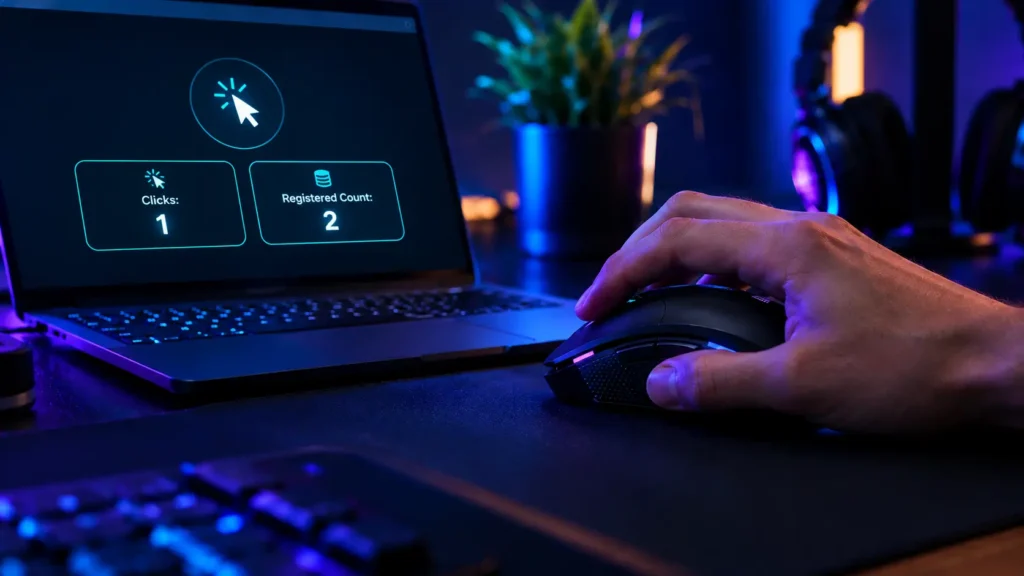
The catch is that metal bounces. When the contacts meet they can flutter for a split second, and to the computer that flutter can look like a burst of clicks. Mice handle it with debounce time, a short window where extra signals get ignored. Too short and you get ghost double clicks. Too long and fast clicks can disappear, which is just as irritating.
Metal wears down too. After enough clicking the leaf can lose its tension, and that’s one of the classic reasons a mouse starts double clicking out of nowhere. If that’s happening to yours, our double-click guide goes through the causes and fixes.

Inside an optical switch
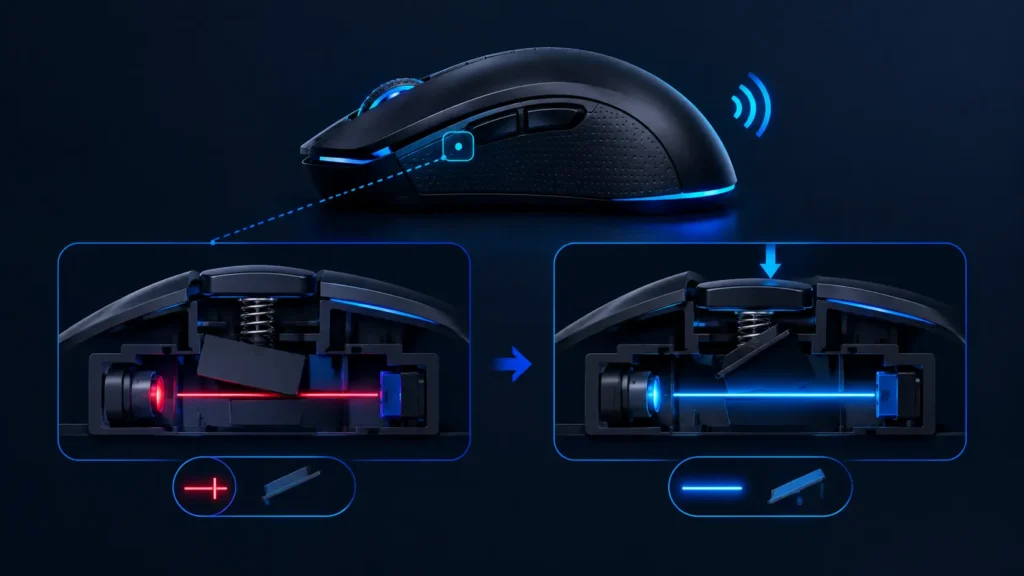
An optical switch has an infrared beam inside it. Press the button and a small shutter slides out of the way, the light gets through, and the mouse reads that as a click. Razer describes its own switches the same way, with the shutter clearing the path for the beam.
Nothing touches, so nothing bounces. That’s why brands say optical switches do not need debounce time at all. And with no metal rubbing on metal, there’s less to wear out.
Where hybrids fit
A few mice try to have it both ways. Logitech’s LIGHTFORCE switches, which the G502 X uses, are hybrid optical-mechanical. Logitech says they combine the benefits of optical switches with the actuation feel of mechanical ones. Light does the detecting, but you still get a proper tactile click under your finger.
Is not this the same as optical vs laser?
Nope, and people mix these up all the time. Optical vs laser is about the sensor, the part that tracks your hand. Optical vs mechanical is about the switches under your buttons. A mouse can have an optical sensor and mechanical switches, and that’s a very common combination. For the sensor side, our optical vs. laser guide has you covered.
So is optical faster?
On paper, yes. Glorious, for example, says optical switches send a click in about 0.2 ms, against 1 ms or more for mechanical ones. They sell optical mice, so remember that’s their number.
Say it’s right. One frame on a 144 Hz monitor lasts almost 7 ms. A difference under a millisecond is a tiny slice of that, and your own reaction time is a couple of hundred milliseconds. I cannot picture anyone feeling that gap in a real match.
Debounce is what can actually change things. A mechanical mouse with a long debounce setting can feel a bit sluggish or swallow fast clicks, while a well-tuned one hides it nicely. How the mouse is set up often counts for more than the label on its switches.
Double clicks, and how long switches last
This is where the choice shows up in real life. A worn mechanical switch, or a debounce time that’s too short, can turn one click into two. Optical switches avoid most of that because there’s nothing to bounce or wear out. Most, not all. Dirt, a faulty unit or software settings can still cause strange clicks.
The lifespan numbers sound huge, and they are. Even at 10,000 clicks a day, a 50 million rating lasts over 13 years. So the number is not what decides it. Build quality is. Real-world wear does not always follow the figure on the box, which is why people still report double-click failures on mice with giant click ratings.
What do they feel like?
It’s personal, to be honest. Mechanical switches have that crisp, familiar snap lots of players prefer. Optical ones can feel different, and some people find them lighter or less snappy. The mouse matters as much as the switch, though. Spring tension, button shape and travel all change the feel, which is exactly why hybrids exist.
If feel is your priority, hold the mouse before buying if you can. Reading about a click only gets you so far.
What we saw with two mice
Spec sheets love to talk about switch type, so we paid more attention to how the clicks behaved in use.
The Logitech G502 X uses the hybrid LIGHTFORCE switches, and in our use its clicks stayed crisp, which is what that design is going for. The Corsair Katar Pro XT has Omron switches with Corsair’s Quickstrike buttons, and we ran a rapid clicking test on it to see how it handled quick, repeated presses.
To see how these and other mice fit different budgets, our wired mouse picks and premium mouse picks are the next stops.
Which one should You Pick?
If your budget is tight, go mechanical. It’s cheaper, it’s everywhere, and a good one will serve you fine for years. If double clicks are what you are afraid of, optical or a hybrid is the safer bet, since there’s nothing inside to bounce or wear out the same way.
Love a crisp, tactile snap? Mechanical or a hybrid will suit you better. Playing competitive FPS and chasing the snappiest response? Either one works. Sensor, weight and shape will do far more for your aim than the switch type. And if you do a lot of rapid clicking in clicker-style games, optical is a natural fit, though a mechanical mouse with a low debounce setting can do the job too.
Cannot try the mouse before buying? Check the return policy first, then go with the best-reviewed option in your budget. That’s honestly a safer move than picking on switch type alone.
Mistakes that People Make
The biggest one is thinking optical automatically means a better mouse. The switch is only one piece. Sensor, shape, weight and software count just as much, and what makes a good gaming mouse covers the full picture.
Then there’s mixing up switches and sensors, which we sorted out above, and buying purely on click count. A 100 million badge looks great on a box, but it says nothing about how the click feels.
One more catches a lot of people: dropping debounce to zero to chase speed. On a mechanical mouse that’s an easy way to get double clicks. If you would like to check your own mouse, our testing guide walks through some simple checks, and if all of this is new, our beginner buying guide is a good starting point.
Final Verdict
Optical switches use light, mechanical ones use metal contact, and hybrids borrow from both. Optical has the edge on paper for double clicks and rated lifespan. Mechanical costs less and has a feel a lot of people love. In everyday play the difference is smaller than the box makes it look.
Pick the mouse that fits your hand and budget, then pay attention to how its clicks behave. A great mouse with either switch beats a weak one with the fancier badge.
Frequently Asked Questions (FAQs)
Everything on this page comes from our team’s own experience, along with feedback from Amazon buyers and other verified users. We try to be straight about what we have seen, but experiences differ, and something that felt great to us would not necessarily feel the same to you. Fit, feel and habits are personal, so treat our advice as a starting point, not a promise.
We also pay attention to what real owners keep saying, not just what a spec sheet promises. If something looks great on paper but users keep flagging the same issue, we will mention it.
8 Responses