
Best Gaming Mouse for FPS Games: 5 Picks Built for Speed
Let’s get one thing out of the way. A real FPS player does not care about RGB. Not even a little. What they care about is how fast a click registers, how the sensor behaves mid-flick, and whether the mouse feels exactly the same in round 25 as it did in round one. Performance and click latency. Everything else is decoration.
So that’s how we judged these five. Weight, sensor, switch speed, polling rate, battery. Lighting never got a vote. Four of them are wireless flagships built for competitive shooters, and one is a limited edition we’ll be upfront about.
Specs come from the product listings. When a listing was thin, we say so instead of guessing.
Our Top Recommendation
If you want the single best pick, buy the Razer Viper V4 Pro. It’s 49 grams, runs a 50K optical sensor, polls at 8K, uses Gen-4 optical switches, and lasts up to 180 hours. It’s the mouse we would hand to anyone who just wants to win more flicks.
Care most about click speed? Logitech G PRO X2 SUPERSTRIKE, with magnetic analog switches you can tune. Want a shape that fills your palm? Razer DeathAdder V4 Pro. Prefer a symmetric shell? Corsair M75 AIR. And if you like owning something rare, there’s the ASUS ROG Keris II Origin Kojima Edition.
Why FPS Players Should Ignore the Lighting
You cannot aim with a rainbow. Lighting adds nothing to tracking, nothing to speed, and on wireless mice it only takes from battery. The numbers that matter for shooters are weight, sensor consistency, switch response, and polling. If you want a proper look at the click part of that, our click latency guide explains why a few milliseconds change how a shot feels.
Polling rate matters too, though less than the box suggests. Here’s what it actually changes, and why 8K isn’t automatically better for everyone.
What We Actually Cared About
Weight, sensor accuracy, switch response, battery, and comfort for fast movement. Not DPI bragging rights. If those huge sensitivity numbers confuse you, this DPI explainer sorts it out. And if you want to check a mouse yourself, here’s how to test tracking and accuracy.
We also wanted variety. Ultralight and ergonomic, rapid-trigger and symmetric, plus one oddball. Wireless stability mattered since four of the five are wireless. Not sure that’s for you? This wired vs. wireless breakdown covers it.
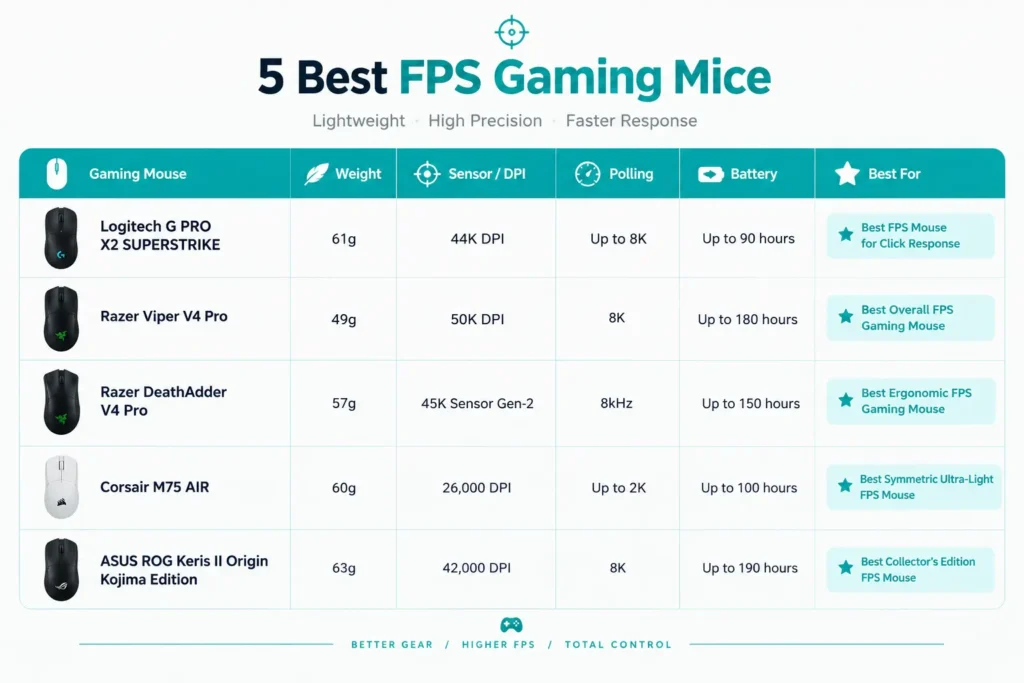
Quick Comparison Table
| Gaming Mouse | Weight | Sensor / DPI | Polling | Battery | Best For |
|---|---|---|---|---|---|
| Logitech G PRO X2 SUPERSTRIKE | 61g | 44K DPI | Up to 8K | Up to 90 hours | Best FPS Mouse for Click Response |
| Razer Viper V4 Pro | 49g | 50K DPI | 8K | Up to 180 hours | Best Overall FPS Gaming Mouse |
| Razer DeathAdder V4 Pro | 57g | 45K Sensor Gen-2 | 8kHz | Up to 150 hours | Best Ergonomic FPS Gaming Mouse |
| Corsair M75 AIR | 60g | 26,000 DPI | Up to 2K | Up to 100 hours | Best Symmetric Ultra-Light FPS Mouse |
| ASUS ROG Keris II Origin Kojima Edition | 63g | 42,000 DPI | 8K | Up to 190 hours | Best Collector’s Edition FPS Mouse |
Best FPS Gaming Mice, Reviewed

This one is all about the click. Customizable rapid-trigger magnetic analog switches, adjustable click haptics, 61 grams, USB-C, and polling listed as “<8K” (treat 8K as the ceiling). Instead of one fixed click, you tune how it feels and how fast it resets.
We spent a few sessions in a tactical shooter adjusting the rapid-trigger point and the haptics. Dialing it in took a session or two, and after that repeated taps registered faster and more consistently. Not magic, but noticeable. Players who are picky about click feel keep saying the haptics are the first thing they mess with.
If you are curious how switch types and debounce affect repeated clicks, our debounce guide is worth a read.
Pros
- Rapid-trigger magnetic analog switches
- Adjustable click haptics
- 61g build
- USB-C
- Strong choice for click-focused players
Cons
- Setup takes time
- Heavier than the 49g Viper
- The “<8K" polling wording is vague
- The advanced switches are overkill for casual players

49 grams is the first thing you notice. It’s the lightest mouse on this list, backed by a 50K DPI optical sensor, Gen-4 optical switches, 8K polling, a scroll wheel, USB-C charging, and up to 180 hours of battery. Works with PC and Mac. If you wonder why weight matters so much for flicks, our weight guide explains it.
Here’s the part nobody mentions. That 180-hour figure is at 1,000Hz. We ran it at 8K for a week to see what happens, and the battery dropped noticeably faster, exactly as you’d expect. 8K is real, but for most players the sweet spot is a lower rate. We would run 1K or 2K and save the battery.
The shape is symmetrical and works for claw and fingertip grips. If you are not sure which you use, our grip guide helps. Players coming from a heavier mouse say the first day feels almost too light, then it becomes normal, and heavier mice start to feel sluggish.
It’s also a bit long for very small hands, so measure before you buy.
Pros
- 49g build
- 50K optical sensor
- Gen-4 optical switches
- 8K polling
- Up to 180 hours of battery
- Symmetrical shape
Cons
- 8K polling cuts battery life a lot
- Too light for some people
- A bit long for small hands
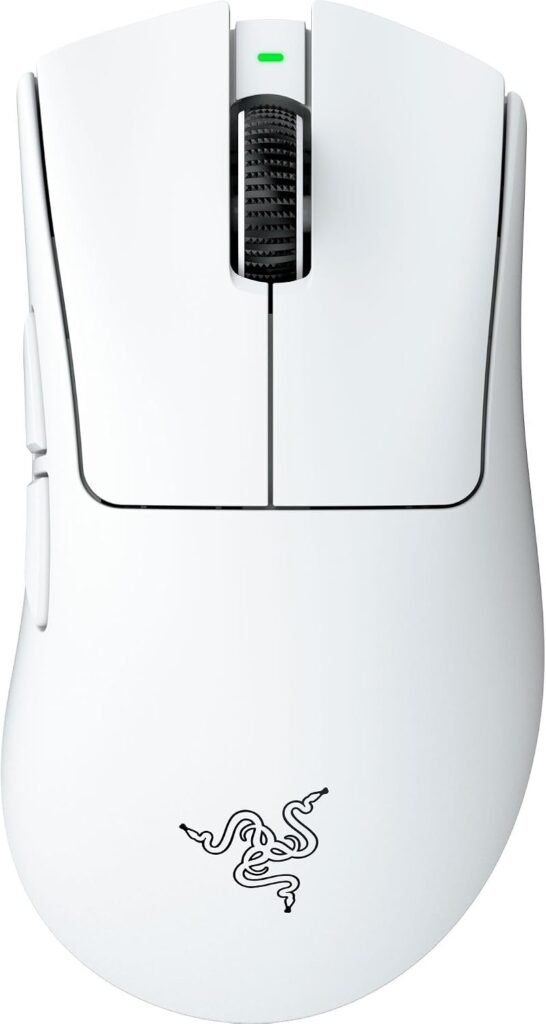
Light and ergonomic do not often show up together. The DeathAdder V4 Pro manages 57 grams with HyperSpeed Wireless Gen-2, a 45K Gen-2 sensor, Gen-4 optical switches, an optical scroll wheel, 8kHz polling, USB-C, and up to 150 hours of battery. The shape follows the DeathAdder line, built around a right-handed palm grip.
We put it through a stretch of ranked sessions to see how it handled fast flicks while still keeping the hand supported. It held up. Flicks felt controlled, and nothing cramped late in the session.
Palm-grip players who tried lighter symmetrical mice say this is the one that finally let them keep their grip. If an ergonomic body matters most, it’s the pick over the Viper.
Pros
- 57g body
- HyperSpeed Wireless Gen-2
- 45K Gen-2 sensor
- Gen-4 optical switches
- Optical scroll wheel
- 8kHz polling
- Up to 150 hours of battery
Cons
- Right-handed shape only
- Heavier than the Viper
- 45K DPI is far more than anyone needs

Corsair’s pitch is simple. Ultra-light, ultra-fast input, a symmetric shape, 26,000 DPI, iCUE compatibility, and support for PC and Mac. The listing does not give a weight or battery figure, so we would not pretend to know either.
A symmetric shell is easy to live with if you do not want a sculpted palm shape. Players who like Corsair’s iCUE software say tuning buttons and DPI is simple, though they want the numbers on weight and battery spelled out more clearly.
Pros
- Symmetric shape
- 26,000 DPI
- iCUE compatibility
- PC and Mac support
Cons
- No weight or battery listed
- Needs iCUE for full customization
- “Ultra-fast input” is marketing until you see numbers
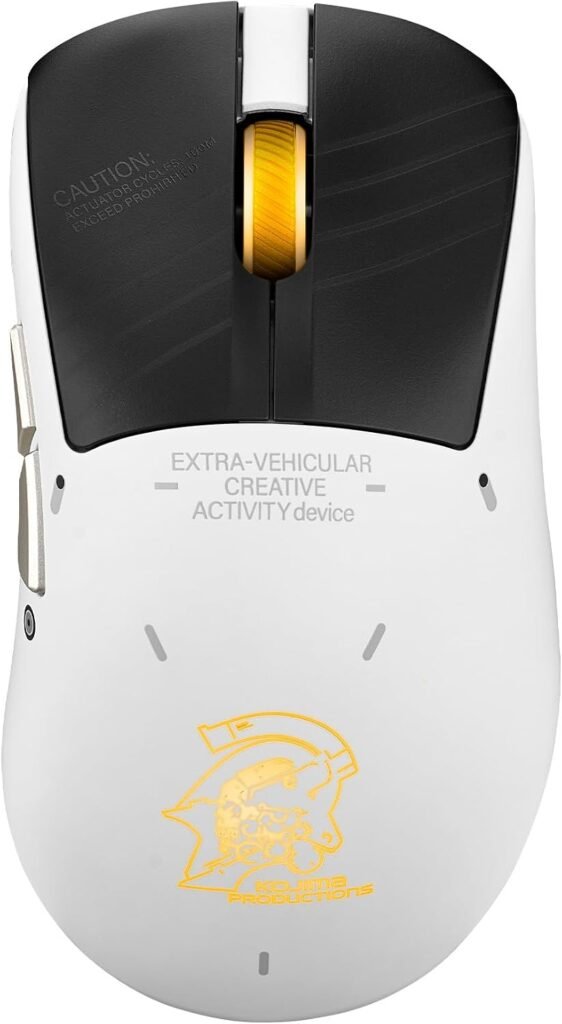
The oddball. It’s a limited Kojima Edition of the ROG Keris II, right-handed, with RF wireless, Bluetooth, USB Type-A, an optical sensor, and 42,000 DPI. The listing is thin on everything else, so weight, battery, and polling remain unknown.
If you like owning something unusual and you want a capable wireless mouse, it works. Buyers who picked it for the edition say the design is the draw. For pure FPS value, the Viper or DeathAdder are safer buys.
Pros
- Rare collector’s design
- Right-handed shape
- Tri-mode connectivity
- 42,000 DPI optical sensor
Cons
- Very little listed beyond DPI
- Right-handed only
- Better value elsewhere
Final Thoughts
If you are serious about FPS, spend your money on weight, sensor, and switch speed. Razer Viper V4 Pro is the best overall. Logitech G PRO X2 SUPERSTRIKE wins on tunable clicks. Razer DeathAdder V4 Pro is the ergonomic pick. Corsair M75 AIR is the symmetric option, and the ASUS ROG Keris II Origin Kojima Edition is for collectors.
Pick for how it feels in your hand, then check the numbers. Lighting can wait.
Frequently Asked Questions (FAQs)
We cannot physically test every product in every roundup — with dozens of gaming mice covered across this site, that’s simply not realistic for our team. What we do instead is verify every listing against the manufacturer’s official specs, cross-check claims across multiple independent reviews and long-term user reports, and pull out patterns from real buyer experiences on platforms like Amazon. When we do get hands-on with a specific product, we will say so directly in that section.
Our recommendations reflect what verified users and independent testers consistently report — not just what a spec sheet promises. If something looks great on paper but users repeatedly flag an issue, we mention it. That’s the standard we hold every pick on this list to.
2 Responses