
Premium vs Budget Gaming Mouse: Is the Extra Money Worth It?
Two mice sitting on the shelf. One costs about as much as a pizza. The other costs more than your last game. Both say “gaming mouse” on the box, and both have RGB, so it’s fair to wonder what the difference actually is.
Short answer: premium does not make you aim better. It makes the small annoyances go away. Whether that’s worth your money comes down to how you play.
The Short Answer
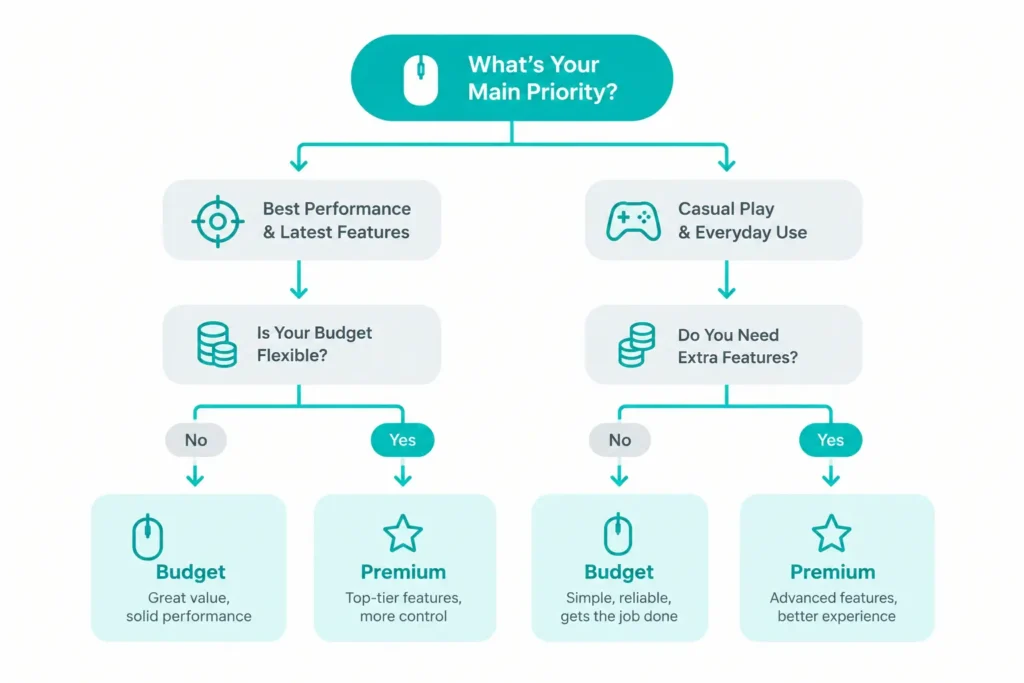
- Casual games, school, office, first gaming mouse? Budget’s fine. Honestly.
- Ranked shooters, long sessions, or you want it to last for years? Premium starts to earn its price.
- Still not sure? Go cheap first. Once something starts bugging you, that’s your upgrade signal.
Quick Comparison Table
| Design Factors | Budget (roughly under $25) | Premium (roughly $100+) |
|---|---|---|
| Weight | Often 50 to 85 grams | Often 55 to 65 grams, a few lighter |
| Sensor | Fine for most people | Top-tier, built for esports |
| Clicks | Good enough, sometimes mushy | Crisp and consistent |
| Battery (wireless) | Decent, often rechargeable | Long, often 90+ hours |
| Software | Basic, or none | Deep, sometimes heavy |
| Build | Hit or miss | Tight and solid |
| Best for | Casual play, first mouse | Ranked, long sessions, daily use |

What You are Really Paying For
Price does not buy you skill. It buys you fewer things to complain about.

Where Budget Holds Up
You can get more from a cheap mouse than you would think. Adjustable DPI, programmable buttons, RGB, even quiet clicks all show up under $25 now.
Casual gaming, schoolwork, an office desk? Budget is more than enough. First gaming mouse? Even better. You will figure out what you like before you spend real money on it. Want to see what’s good right now? Check our budget gaming mouse picks, wired mice under $10, and wireless mice under $25.
Where Premium Earns Its Keep
If you play a lot, premium pays you back. Competitive shooters, long ranked sessions, or a mouse you use all day for work and play. That’s where the better clicks, tracking and build start to matter.
It also tends to last longer. If you hate replacing gear, our guide on how long a gaming mouse lasts is worth a read. Shooter player? Our FPS mouse picks are a good next stop. Ready to spend? Our premium picks are right here.
What We Saw, and What Buyers Say
Specs do not tell the whole story. Here’s what our team noticed using both kinds, plus what buyers keep saying.
Here, these reviews are given.
Our team on the budget side saw:
- SMAIGE: We ran it through a few mixed sessions of casual games and office work, mostly checking the buttons and DPI switching. Nothing missed, no odd jumps.
- REBOCOON: We set its silent clicks next to a regular loud mouse in a quiet room. The difference was obvious right away.
- Typehaven G57: We kept it in rotation for a full week. It reconnected almost instantly every time we swapped between 2.4GHz and Bluetooth.
- Redragon M725: Two of our testers who play fast shooters spent a few sessions on it. The shell felt weird on day one, almost too light, and then it just clicked.
Our team On the premium side saw:
- Logitech G PRO 2: We swapped the magnetic side buttons back and forth for a few sessions. They stayed locked in through fast clicking.
- Razer Viper V3 Pro: We ran it through high-intensity competitive sessions. The battery stayed close to the claimed number, even with polling maxed out.
- Razer DeathAdder V3 Pro: A week of evening sessions, a few hours of FPS and MOBA each night. The palm stayed supported, and nothing cramped.
What buyers say:
- Budget: People who bought a cheap mouse as their first one often say they did not expect this many buttons and this much lighting for the money. Some are surprised a cheap wireless mouse holds a connection so well. The gripes are usually basic software and a build that matches the price.
- Premium: Light weight comes up first, then battery and grip. Buyers often call these mice comfortable and solid. The usual complaints are the price and the software.
Where our team and buyers agree
- Budget surprises people: Our testers and buyers both expected less and got more.
- Premium shows up in the details: Clicks, battery and build are what stand out.
- Software is the weak spot on both sides: Basic on budget, heavy on premium.
Who Should Buy What
Want a quick way to judge a mouse you already own? Our performance and accuracy testing guide shows you how.
Final Verdict
Premium is not about aiming better. It’s about clicks that stay crisp, a build that does not creak, and a battery you forget about.
Budget is the smarter buy if you play casually or you are just starting. Premium is the smarter buy if you play a lot and notice the small stuff. Spend based on how you play, not on the number printed on the box.
Frequently Asked Questions (FAQs)
Everything on this page comes from our team’s own experience, along with feedback from Amazon buyers and other verified users. We try to be straight about what we have seen, but experiences differ, and something that felt great to us would not necessarily feel the same to you. Fit, feel and habits are personal, so treat our advice as a starting point, not a promise.
We also pay attention to what real owners keep saying, not just what a spec sheet promises. If something looks great on paper but users keep flagging the same issue, we will mention it.